Employee Task Tracking vs Activity Monitoring: What
Each Metric Can and Cannot Tell You
2026-11-23
•
Author:
•
~10 min read
•
Updated November 23, 2026
- Employee Task Tracking vs Activity Monitoring: The Core Difference
- What Is Employee Task Tracking?
- —What Task Tracking Can Tell Managers
- —What Task Tracking Cannot Tell Managers
- What Is Employee Activity Monitoring?
- —What Activity Monitoring Can Tell Managers
- —What Activity Monitoring Cannot Tell Managers
- Task Completion vs Active Time
- —Employee A
- —Employee B
- What Managers Should Review Together
- —1. Effort
- —2. Delivery
- —3. Workload
- —4. Outcome
- Where Employee Task Tracking Adds Context
- Workload Can Change the Interpretation Again
- When Should You Use Task Tracking?
- When Should You Use Activity Monitoring?
- When Managers Need Both
- Common Mistakes When Interpreting Employee Data
- —Treating Active Time as Productivity
- —Treating Every Completed Task as Equal
- —Ignoring Waiting Time and Dependencies
- —Ignoring Workload
- —Reviewing Data Without a Defined Purpose
- How TrackForce Connects Tasks, Activity, Time, and Workload
- Use Dashboards for Decisions, Not Surveillance
- A Simple Review Framework
- Frequently Asked Questions
- —Is employee task tracking better than activity monitoring?
- —Can activity monitoring prove productivity?
- —What is the difference between task completion and active time?
- —What should managers review every day?
- —When should managers use both task tracking and activity monitoring?
- —Does TrackForce include task and project management?
- Better Productivity Decisions Need More Than One Metric
Employee Task Tracking vs Activity Monitoring: What Each Metric Can and Cannot Tell You
An employee can show eight hours of recorded activity and still have an important project stuck in the same place.
Another employee can close every assigned task while quietly working longer hours, switching constantly between priorities, or carrying more work than the rest of the team.
That is why employee task tracking vs activity monitoring should not be treated as a choice between two competing metrics.
They answer different management questions.
Employee task tracking shows whether assigned work is moving. Activity monitoring shows how work time and digital activity are distributed.
Neither one, by itself, tells a manager the complete story of productivity.
The more useful approach is to understand what each signal can tell you, what it cannot tell you, and when task, time, activity, workload, and business outcomes need to be reviewed together.
Employee Task Tracking vs Activity Monitoring: The Core Difference
The simplest difference is this:
Task tracking measures movement against assigned work.
Activity monitoring records work-time and digital activity signals.
Task tracking usually focuses on:
task ownership
status
priority
due dates
progress
project relationship
completion
backlog
Activity monitoring may include:
recorded work time
active and idle periods
application usage
website activity
attendance patterns
context switching
other configured work signals
The distinction matters because activity does not automatically mean progress, and task completion does not always explain how work was performed.
Metric | Main question | Strongest use | Main limitation |
|---|---|---|---|
Task tracking | Is assigned work moving? | Delivery, accountability, backlog and deadlines | Does not explain how work time was used |
Activity monitoring | What patterns appear during working time? | Time visibility, activity patterns and exception review | Does not prove task completion or business value |
Both together | Is work effort aligned with delivery? | Productivity, workload and delivery review | Still requires management context |
What Is Employee Task Tracking?
Employee task tracking records assigned work and how that work progresses through a workflow.
A task typically has:
an owner
a project
priority
status
planned dates
due date
progress or completion status
The main value of employee task tracking is business context.
Instead of knowing that someone spent three hours in a spreadsheet, a manager can understand that those three hours were connected to a specific reconciliation task, client deliverable, campaign, report, or project milestone.
What Task Tracking Can Tell Managers
Task data can help managers answer questions such as:
Which work is currently in progress?
Which tasks are overdue?
Where is the backlog growing?
Who owns the next action?
Which project is falling behind?
Which assignments are blocked?
What has actually been completed?
For project managers and team leads, task movement is one of the clearest ways to see whether planned work is progressing.
What Task Tracking Cannot Tell Managers
Task tracking has limits.
A task board cannot explain:
how much active work happened during the day;
whether someone experienced repeated interruptions;
whether time was spent waiting for approvals;
whether employees were attending meetings;
whether workload was concentrated on one person;
whether work required extensive research or offline thinking;
how applications and websites were used during the workflow.
This is where task tracking vs activity monitoring becomes important.
A delayed task may represent poor execution, but it may also represent a dependency, approval bottleneck, technical problem, or unrealistic workload.
Task status alone cannot tell you which explanation is correct.
What Is Employee Activity Monitoring?
Employee activity monitoring records selected signals about how work time and digital systems are used.
Depending on the configuration, those signals can include active and idle time, applications, websites, attendance, schedules, screenshots, or other work-related activity.
The purpose should be defined before the data is collected.
Activity data is most useful when it answers a specific operational question rather than becoming a universal employee score.
What Activity Monitoring Can Tell Managers
Employee monitoring metrics can help identify:
changes in active and idle patterns;
unusually long work periods;
attendance exceptions;
application or website usage patterns;
repeated context switching;
changes in normal work behavior;
teams or workflows that need investigation.
This provides context around how work is happening.
TrackForce's guide to active and idle time reporting explains why these signals should be interpreted as work-pattern data rather than direct proof of employee performance.
What Activity Monitoring Cannot Tell Managers
Activity monitoring cannot independently tell you:
whether the most important task was completed;
whether a project moved closer to deadline;
whether the work was accurate;
whether the customer received a good outcome;
whether the employee made a strong decision;
whether visible activity created useful business value.
This distinction is critical.
The U.S. Office of Personnel Management uses measures such as quality, quantity, timeliness, and cost-effectiveness when describing employee performance standards. Activity or device interaction alone does not cover those dimensions.
So active time should usually be treated as supporting context, not as the final performance verdict.
Task Completion vs Active Time
Consider two employees.
Employee A
High recorded active time
Frequent application use
Long work hours
Low movement on priority tasks
At first glance, the employee looks busy.
But the actual issue could be:
excessive context switching;
unclear priorities;
technical blockers;
too many meetings;
waiting for decisions;
workload spread across too many assignments.
High activity has not necessarily produced high delivery.
Employee B
Moderate active time
Several priority tasks completed
Deadlines met
Good delivery quality
The lower activity level does not automatically indicate weaker performance.
The employee may have experienced:
focused uninterrupted work;
meetings;
calls;
offline review;
planning;
research;
efficient tool use.
This is why task completion vs active time should never be collapsed into one universal productivity score.
What Managers Should Review Together
A more useful productivity view separates four questions.
1. Effort
How was working time distributed?
Relevant signals may include:
work hours
active and idle patterns
application usage
work schedules
2. Delivery
What actually moved?
Relevant measures include:
task completion
overdue work
project progress
backlog
milestones
3. Workload
Is work distributed sustainably?
Look at:
task allocation
project assignments
tracked time
overdue work
concentration of workload
4. Outcome
Did the work achieve what the business needed?
Depending on the role, that may involve:
quality
timeliness
customer result
accuracy
revenue
cycle time
rework
business impact
This layered view is more useful than asking whether someone's active time was "good" or "bad."
For a deeper explanation of this distinction, TrackForce's guide to workforce analytics vs employee monitoring separates individual activity evidence from broader workflow and business context.
Where Employee Task Tracking Adds Context
Raw activity data becomes more useful when managers can connect it to actual work.
Imagine an agency team.
The employee shows a full day of active computer usage.
Without task context, management knows the person was active but does not know:
which client work moved;
whether campaign tasks progressed;
whether an approval was blocking delivery;
whether the employee worked on the correct priority;
whether the deliverable is closer to completion.
Employee task tracking adds that missing layer.
Activity tells you something happened.
Tasks and projects tell you what that activity was supposed to achieve.
Workload Can Change the Interpretation Again
Even activity and task completion together may not tell the entire story.
Suppose one employee completes 15 tasks while another completes 8.
That does not automatically mean the first employee is more productive.
The eight tasks may be larger, more complex, or dependent on other teams.
Managers should also consider:
task complexity
workload allocation
project priority
waiting time
dependencies
quality
rework
TrackForce's guide to employee performance monitoring metrics explains why activity, workflow, output, and outcome data should not be treated as interchangeable measures.
When Should You Use Task Tracking?
Task tracking should be the stronger management lens when your main question is:
Are assigned deliverables moving?
It is particularly useful for:
project teams
agencies
software teams
professional services
operations teams
back-office workflows
teams with clear assignments and deadlines
Typical questions include:
What is overdue?
Who owns this?
Which project is delayed?
Which task is blocked?
What was completed this week?
When Should You Use Activity Monitoring?
Activity monitoring is more relevant when the main question is:
What patterns are happening around work time?
It can support:
time visibility
attendance review
work-pattern analysis
application usage review
operational exception detection
remote and hybrid workforce visibility
But managers should avoid turning these signals into automatic performance conclusions.
For remote teams specifically, TrackForce's guide to assessing remote productivity without overmonitoring explains how activity signals can be combined with outputs, workload, quality, and context.
When Managers Need Both
In many remote, hybrid, agency, software, BPO, and operational environments, the most useful model is not task tracking or activity monitoring.
It is both.
Management need | Recommended view |
|---|---|
Check deadlines and ownership | Task tracking |
Check backlog and project movement | Task tracking |
Review work-time patterns | Activity monitoring |
Review attendance exceptions | Activity monitoring |
Understand workload distribution | Tasks + time + workload |
Investigate delayed delivery | Tasks + activity + dependencies |
Evaluate productivity | Tasks + outcomes + quality + activity context |
The combined view is useful because each layer can explain the limitations of another.
Common Mistakes When Interpreting Employee Data
Treating Active Time as Productivity
Active time measures interaction with a device.
It does not measure:
judgment;
quality;
creativity;
customer impact;
completed outcomes.
TrackForce's current guidance on workforce analytics software similarly separates activity from stronger workflow, output, and outcome measures.
Treating Every Completed Task as Equal
Task count can also mislead.
Closing ten small tasks is not automatically more valuable than completing one difficult project milestone.
Managers need task context.
Ignoring Waiting Time and Dependencies
A task may remain open because an employee is waiting for:
manager approval;
client feedback;
another department;
system access;
external information.
A stalled task is a signal to investigate, not an automatic performance conclusion.
Ignoring Workload
High activity combined with a growing backlog may indicate overload.
Low activity combined with completed priority work may indicate efficiency.
Context changes interpretation.
Reviewing Data Without a Defined Purpose
Activity information should have a clear management purpose.
Organizations should define:
what is collected;
why it is collected;
who can review it;
which decisions it can support;
what other evidence is required.
Monitoring requirements vary by jurisdiction, so employers should also review applicable employment and privacy obligations before implementation.
How TrackForce Connects Tasks, Activity, Time, and Workload
TrackForce is positioned as employee productivity and workforce monitoring software designed to give managers more context than screen time alone.
Its documented capabilities include:
active and idle time visibility;
application and website activity;
projects;
tasks;
project progress;
task status and priority;
team workload;
time worked;
attendance-related reporting;
daily and monthly reporting;
context-switching reports;
role-based access;
workforce dashboards.
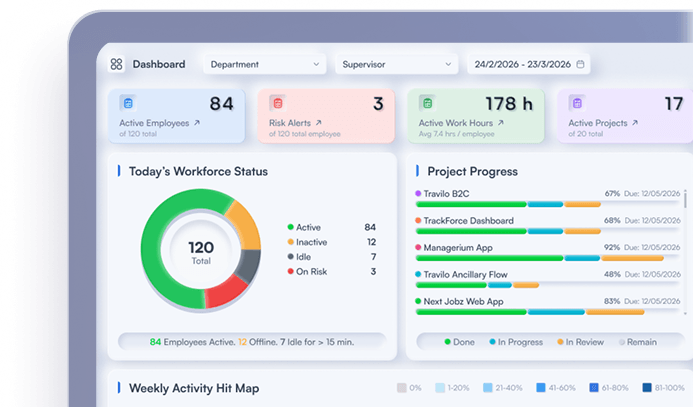
TrackForce's project and task capabilities allow managers to review assigned work beside activity and time data rather than keeping project progress in one tool and workforce visibility in another.
That combination is important because employee task tracking vs activity monitoring should not end with a binary choice.
The management question should be:
Which combination of signals gives us enough context to make a better decision?
You can review the broader TrackForce workforce productivity platform for its current product positioning and capabilities.
Use Dashboards for Decisions, Not Surveillance
A useful productivity dashboard should help a manager decide what to do next.
For example:
remove a blocker;
redistribute work;
follow up on an overdue task;
investigate an unusual activity pattern;
adjust project priorities;
check whether workload is becoming unsustainable.
TrackForce's guide to team productivity dashboards provides a broader framework for connecting delivery, workload, activity, and business outcomes.
The dashboard has done its job when it improves the management decision.
Collecting more data is not the objective.
A Simple Review Framework
Before reacting to an employee metric, ask four questions.
1. What exactly does this metric measure?
Active time, task status, project progress, workload, and output are different signals.
2. What can this metric not prove?
Knowing its limitation prevents overinterpretation.
3. What other evidence gives it context?
For activity data, that may be tasks or outcomes.
For task data, it may be workload, quality, dependencies, or time.
4. What management action should follow?
If the data does not support a useful decision, it may not need constant attention.
Frequently Asked Questions
Is employee task tracking better than activity monitoring?
Not necessarily. Employee task tracking is stronger for understanding delivery, ownership, deadlines, and task progress. Activity monitoring is stronger for understanding time-use and digital work patterns. Many managers need both because the two signals answer different questions.
Can activity monitoring prove productivity?
No. Activity monitoring can provide evidence about active and idle periods, applications, websites, attendance, and work patterns, but it cannot independently prove quality, task completion, priority alignment, or business value.
What is the difference between task completion and active time?
Task completion records whether assigned work was completed. Active time records periods of detected device interaction. One measures workflow progress while the other provides activity context.
What should managers review every day?
Daily operational review can include attendance status, time worked, significant active or idle exceptions, and important task movement. Managers should avoid making performance judgments from isolated daily signals.
When should managers use both task tracking and activity monitoring?
Use both when you need to understand whether work effort is aligned with delivery. Task tracking provides project and assignment context, while activity monitoring helps explain work patterns around that delivery.
Does TrackForce include task and project management?
TrackForce's documented functionality includes project management, task lists and details, project progress, team workload, time-related data, and workforce activity monitoring.
Better Productivity Decisions Need More Than One Metric
The practical lesson from employee task tracking vs activity monitoring is simple.
Activity can show how work happened.
Tasks can show whether assigned work moved.
Workload can explain capacity.
Quality and business outcomes can show whether the work actually delivered value.
Managers get a clearer picture when those signals are interpreted together instead of forcing one number to represent productivity.
If your team currently uses separate systems for task progress, time visibility, and workforce activity, explore TrackForce to see how those signals can be reviewed in a more connected workflow.
Similar blog you can explore
Workforce Analytics Software: Alerts, Reporting and Governance
How to Assess Remote Team Productivity Without Overmonitoring
Active and Idle Time Reporting: How to Interpret Work Patterns
Start Your 30-Day
Free TrackForce Trial