Active and Idle Time Reporting:
How to Interpret Work Patterns
2026-11-11
•
Author: TrackForce
•
~1 min read
•
Updated November 11, 2026
- What Active and Idle Time Reporting Measures
- Active Time Is Not the Same as Productive Time
- How to Interpret Seven Common Work Patterns
- —1. Consistently High Active Time
- —2. Short Idle Periods Throughout the Day
- —3. One Long Idle Period
- —4. Activity Drops at the Same Time Across a Team
- —5. High Activity With Weak Output
- —6. Lower Activity With Strong Results
- —7. A Sudden Change From the Employee's Normal Pattern
- Use a Four-Step Interpretation Method
- —Step 1: Verify the Record
- —Step 2: Add Role and Workload Context
- —Step 3: Compare Trends, Not Isolated Minutes
- —Step 4: Connect Activity With Outcomes
- A Manager's Active and Idle Report Checklist
- Set Thresholds Carefully
- Protect Privacy and Trust
- How TrackForce Supports Work-Pattern Interpretation
- Interpret the Pattern, Not Just the Percentage
- Frequently Asked Questions
- —What Is Active Time in Employee Monitoring Software?
- —What Does Idle Time Mean?
- —Is a High Active-Time Percentage Always Good?
- —Can Active and Idle Reports Be Used in Performance Reviews?
- —How Often Should Managers Review Active and Idle Reports?
Active and idle time reporting can reveal when digital work is flowing, where interruptions appear and which teams may need support. It cannot tell you, by itself, whether an employee is performing well.
That distinction matters. A high active-time percentage may reflect focused work, excessive workload or constant application switching. An idle period may represent a break, a meeting, a phone call, document review, creative thinking or work away from the monitored device. The number records device interaction. Managers still have to interpret the work around it.
This guide explains how to read active and idle reports fairly, identify useful patterns and avoid turning activity data into a misleading productivity score.
What Active and Idle Time Reporting Measures
Active time normally represents periods when the monitoring system detects keyboard or mouse interaction on a tracked device. Idle time normally begins after a configured period without detected input. The exact threshold and treatment of meetings, breaks, locked screens and offline work depend on the software configuration.
A report may show:
- Total tracked time
- Active and idle duration
- Active-time or utilization percentage
- The start and end of each idle interval
- Online, offline and break status
- Application and website usage around the period
- Daily, weekly and monthly trends
- Comparisons by employee, team, department or schedule
These measures describe interaction with a device. They do not directly measure accuracy, judgement, customer value, task difficulty or completed output. Responsible active and idle time reporting preserves this distinction. TrackForce's guide to employee performance monitoring tools also separates an activity signal from a performance result.
Active Time Is Not the Same as Productive Time
Active time answers a narrow question: was the person interacting with the monitored computer during that period?
Productive time requires an additional rule. A company may classify selected applications, websites or tasks as productive for a particular role. Even then, the label needs context. A browser can contain a customer portal, research material or entertainment. A spreadsheet can support important analysis or unnecessary rework.
Performance is broader again. It asks whether the person produced the expected result at an acceptable level of quality and timeliness. The US Office of Personnel Management identifies quality, quantity, timeliness and cost-effectiveness as common performance measures. Mouse and keyboard activity do not establish any of those outcomes on their own.
Use this measurement ladder:
| Level | What it tells you | Example |
| Presence | Whether the employee was recorded as available | Logged in during the scheduled period |
| Activity | Whether the device received user input | Keyboard or mouse interaction detected |
| Workflow | How work moved across tools and tasks | Frequent switching between a CRM and email |
| Output | What was completed | Cases resolved or reports submitted |
| Performance | Whether the result met expectations | Accurate work delivered on time |
Active and idle time reporting is most useful near the first three levels. Outcome metrics and managerial review are needed for the last two.
How to Interpret Seven Common Work Patterns
1. Consistently High Active Time
High activity may indicate sustained focus, but it can also signal overload, insufficient breaks or a role that requires continuous input. Check working hours, task volume, error rates and overtime. If active time stays unusually high while quality falls, the team may be working too fast or carrying too much work.
Manager question: Is this a healthy work rhythm, or is the employee compensating for an unrealistic workload?
2. Short Idle Periods Throughout the Day
Several brief idle intervals may be normal. People pause to read, think, speak with colleagues, take calls, attend to customers or rest their eyes. Knowledge work rarely produces continuous input.
Compare the pattern with the role and schedule. A short pause between completed tasks has a different meaning from repeated disconnection during a live support shift.
Manager question: Does the work require activity that the device cannot detect?
3. One Long Idle Period
A long interval deserves verification, not an immediate conclusion. It could represent an unrecorded meeting, training, a scheduled break, field work, a network failure, a locked device or genuine inactivity.
Review the calendar, attendance records, application status, system logs and the employee's explanation. If the interval resulted from missing data, correct the record before it affects any report.
Manager question: What event, assignment or technical issue explains this period?
4. Activity Drops at the Same Time Across a Team
When several employees show the same change, investigate the system of work first. A shared drop can indicate a scheduled meeting, network outage, slow application, approval bottleneck, low incoming demand or unclear priorities.
Team-level active and idle time reporting is valuable here because a pattern across people is less likely to be an individual effort problem.
Manager question: What changed in the team's tools, demand or workflow?
5. High Activity With Weak Output
This combination often exposes friction. Employees may be switching between systems, re-entering data, waiting for approvals, handling avoidable rework or struggling with an unreliable tool.
Review task flow, application switching, process steps, error rates and dependencies. Do not respond by demanding even more activity. The employee may already be using substantial effort inside an inefficient process.
Manager question: Where is effort being consumed without producing a useful result?
6. Lower Activity With Strong Results
An experienced employee may complete work efficiently, use automation or spend more time in meetings and offline review. If quality, timeliness and customer outcomes are strong, lower device activity is not automatically a concern.
This pattern can reveal a better method worth sharing. Ask how the employee organizes the work instead of treating a lower activity percentage as underperformance.
Manager question: Has the employee found a faster or less input-heavy way to achieve the outcome?
7. A Sudden Change From the Employee's Normal Pattern
A change against a person's own baseline is usually more informative than comparison with a universal target. It may indicate a new assignment, leave, workload change, training need, health issue, technical fault or declining engagement.
Look at the trend across several days and invite context. Avoid comparing different roles against the same active-time threshold.
Manager question: What changed in the work, environment or available support?
Use a Four-Step Interpretation Method
Step 1: Verify the Record
Check the monitoring schedule, time zone, idle threshold, device status and missing data. Confirm that breaks, meetings, leave and offline assignments were handled correctly. A clean chart can still contain inaccurate assumptions.
Step 2: Add Role and Workload Context
Interpret the report against the employee's actual responsibilities. A call-centre agent, designer, field coordinator and finance analyst will produce different patterns. Add task volume, complexity, deadlines and dependencies.
Step 3: Compare Trends, Not Isolated Minutes
Use daily or weekly patterns and compare them with a relevant baseline. One idle interval rarely justifies action. A repeated change associated with delayed work, overloaded staff or system problems may justify investigation.
Step 4: Connect Activity With Outcomes
Review quantity, quality, timeliness and customer or business impact. TrackForce's guide to measuring employee productivity without micromanaging explains how to combine these measures without making visible busyness the goal.
A Manager's Active and Idle Report Checklist
Before drawing a conclusion, ask:
- Was the employee scheduled and expected to use the tracked device?
- Is the time zone, monitoring window and idle threshold correct?
- Were meetings, calls, breaks and offline work captured?
- Was there a device, network or application failure?
- Does the pattern repeat over a meaningful period?
- Is the comparison appropriate for the employee's role?
- What tasks, workload and dependencies affected the day?
- Did output, quality or timeliness change as well?
- Has the employee had a chance to explain or correct the record?
- Will the response improve the work, or merely increase visible activity?
If several answers are unknown, investigate before using the data in coaching, appraisal or discipline.
Set Thresholds Carefully
There is no universal healthy active-time percentage. Fair active and idle time reporting must account for job design, schedules, tools, meetings and offline responsibilities.
Use thresholds as exception indicators, not automatic judgements. A threshold can help a manager find a record that deserves review. It should not label the employee's performance without checking context and outcomes.
Document:
- When idle status begins
- Which devices and schedules are covered
- How breaks and offline work are treated
- Which roles can view individual records
- When an exception is reviewed
- How an employee can correct inaccurate data
- Which decisions may use the report
- How long detailed information is retained
Protect Privacy and Trust
Active and idle time reporting involves worker data, so the organization must define a legitimate purpose and follow applicable employment and privacy requirements. Laws vary by location, sector and monitoring method. Obtain qualified advice for every jurisdiction in scope.
The UK's Information Commissioner's Office says worker monitoring should be lawful, fair and transparent, and limited to what is necessary for the stated purpose. Its monitoring workers guidance also warns that collected information can be incorrect or misleading.
Acas advises employers to explain monitoring, consult employees and consider an impact assessment. It notes that excessive monitoring can damage trust, cause stress and reduce productivity. Review the Acas guidance on monitoring performance before designing a UK policy.
Use TrackForce's employee monitoring software privacy checklist to evaluate purpose, notice, access, retention and human review.
How TrackForce Supports Work-Pattern Interpretation
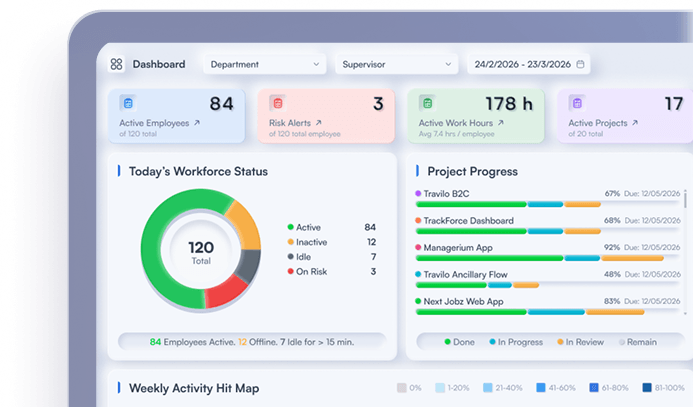
TrackForce provides real-time online and idle status, active work-time visibility, productivity graphs, workflow overviews, usage logs and team comparisons. Its reporting can help managers move from individual events to patterns across days, teams and workloads.
The platform should be configured around a documented management purpose. Managers can use active and idle time reporting to find exceptions, then add application, task, workload and outcome context before deciding what the pattern means. Role-based access and configurable monitoring controls help organizations limit visibility according to responsibility and policy.
Explore the TrackForce feature set or read the comparison of workforce analytics vs employee monitoring to see how activity data becomes useful management evidence.
Interpret the Pattern, Not Just the Percentage
Active and idle time reporting should help managers ask better questions. It should not reduce performance to how continuously someone interacts with a device.
Verify the data, compare trends, add role and workload context, and connect activity with real outcomes. When a pattern changes, investigate whether the cause sits with the employee, the workload, the tools or the process. That approach turns a basic activity report into fairer and more useful workforce intelligence.
Book a TrackForce demonstration to see how active and idle reports can be configured for your team's roles, schedules and management policies.
Frequently Asked Questions
What Is Active Time in Employee Monitoring Software?
Active time normally means a monitored device detected keyboard or mouse interaction. It records device input, not the quality, difficulty or value of the work completed.
What Does Idle Time Mean?
Idle time normally means the monitored device received no detectable input for a configured period. It may represent a break, meeting, call, reading, thinking, offline work, technical problem or genuine inactivity.
Is a High Active-Time Percentage Always Good?
No. High active time may indicate focus, but it can also indicate overload, insufficient breaks, repetitive work or inefficient processes. Review quality, output, workload and employee context before interpreting it.
Can Active and Idle Reports Be Used in Performance Reviews?
They can provide context when collection and use comply with applicable law and policy. They should not be the sole evidence. Include role-specific output, quality, timeliness, workload and the employee's explanation.
How Often Should Managers Review Active and Idle Reports?
Use real-time information for urgent operational exceptions and weekly or monthly trends for workload and process analysis. Routine inspection of every idle interval is rarely necessary for fair performance management.
Similar blog you can explore
Employee Monitoring Software Privacy Checklist for 2027
Remote Team Activity Reporting Software Comparison: 2027
Employee Productivity Monitoring Software: 2027 Evaluation Guide
Start Your 30-Day
Free TrackForce Trial