Workforce Analytics Software: Alerts,
Reporting and Governance
2026-11-18
•
Author: TrackForce Team
•
~1 min read
•
Updated November 18, 2026
- What Is Workforce Analytics Software?
- Alerts, Reports and Governance at a Glance
- Alerts Should Start a Review, Not Deliver a Verdict
- The Anatomy of a Useful Workforce Alert
- Set Thresholds Around Roles and Baselines
- Prevent Alert Fatigue
- Reporting Turns Events Into Patterns
- —Operational reports
- —Management reports
- —Governance reports
- A Good Report Explains Five Things
- Connect Activity With Performance Outcomes
- Governance Makes Analytics Defensible
- —Purpose and permitted use
- —Data minimization
- —Role-based access
- —Retention and deletion
- —Accuracy and correction
- —Human review
- —Change control
- Assign Clear Ownership
- A Practical Alert-to-Action Workflow
- Implementation Plan for Workforce Analytics Software
- —Phase 1: Define the decisions
- —Phase 2: Map the data
- —Phase 3: Configure roles and reports
- —Phase 4: Pilot alerts
- —Phase 5: Communicate and train
- —Phase 6: Review and improve
- How TrackForce Supports Alerts, Reporting and Governance
- Build a System That Produces Better Decisions
- Frequently Asked Questions
- —What does workforce analytics software do?
- —What alerts should workforce analytics software provide?
- —What reports should managers review?
- —What is workforce analytics governance?
- —Can workforce analytics software automatically judge performance?
Workforce Analytics Software: Alerts, Reporting and Governance
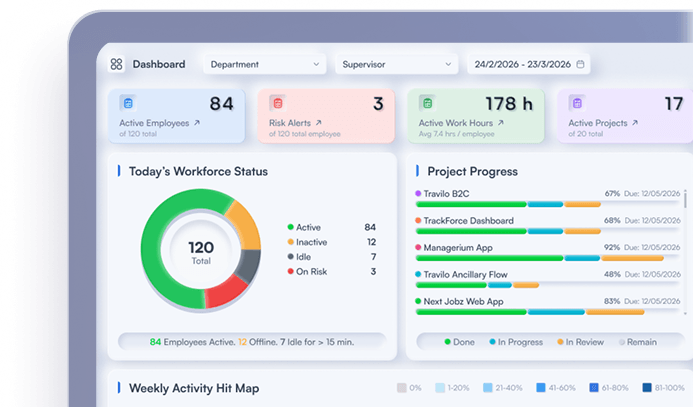
Workforce analytics software becomes useful when it helps a manager notice a meaningful change, understand the pattern behind it and take a fair, documented action. Collecting more employee data does not automatically create better decisions.
A practical platform needs three connected layers. Alerts direct attention to exceptions. Reporting explains what changed across people, teams, tools and time. Governance defines why the data exists, who can see it and how it may influence decisions.
If one layer is missing, the system weakens. Alerts without reporting create noise. Reports without governance encourage inconsistent interpretation. Governance without useful evidence becomes a policy that managers cannot apply.
This guide explains how to evaluate and operate the three layers together.
What Is Workforce Analytics Software?
Workforce analytics software collects and organizes work-related information so managers can identify patterns in attendance, activity, workload, application use, projects and performance context.
Depending on the platform and configuration, it may process:
- clock-in, clock-out and scheduled hours;
- active and idle periods;
- breaks and attendance exceptions;
- application and website use;
- tasks, projects and allocation;
- workload and capacity;
- meeting, file or device events;
- productivity trends;
- daily, monthly and risk reports.
These records show how work happens. They do not independently prove quality, judgement or business value. TrackForce's guide to workforce performance measuring software explains why activity signals need workload and outcome context.
Alerts, Reports and Governance at a Glance
| Layer | Main question | Useful output | Main risk |
| Alerts | What changed enough to deserve attention? | Prioritized exception with owner and status | Noise, false positives or instant judgement |
| Reporting | What pattern explains the exception? | Trend, comparison and supporting context | Misleading averages or disconnected charts |
| Governance | Who may collect, view and act on the evidence? | Policy, roles, retention and review process | Excessive collection or inconsistent decisions |
Strong workforce analytics software connects all three. An alert should open the relevant report, the report should show its source and context, and governance should determine who can review or act on it.
Alerts Should Start a Review, Not Deliver a Verdict
An alert is a rule that identifies an event or pattern outside an agreed condition. It may indicate that something deserves attention. It does not establish why the event happened or who is responsible.
Useful workforce alerts can include:
- repeated late starts against an agreed schedule;
- unusually long work sessions or sustained overtime;
- available capacity falling below a team threshold;
- workload becoming concentrated among a few employees;
- a sharp change in active or idle patterns;
- missing expected work records;
- repeated access or policy exceptions;
- a project consuming more time than its recent baseline.
The alert should describe the observed condition, not make an unsupported conclusion. “Tracked hours exceeded the team baseline by 25% for three weeks” is reviewable. “Employee is unproductive” is an interpretation disguised as a fact.
TrackForce's guide to active and idle time reporting shows why a device-activity change may reflect meetings, workload, technical failure or offline work.
The Anatomy of a Useful Workforce Alert
Every alert should contain enough information for a fair first review:
- Defined condition: The field, threshold and comparison period.
- Relevant scope: The role, team, schedule or project to which it applies.
- Source: The records or system that produced the signal.
- Time window: When the exception began and whether it is continuing.
- Severity: Informational, review required or urgent operational risk.
- Owner: The role responsible for reviewing it.
- Status: New, acknowledged, investigating, resolved or dismissed.
- Context link: The report, timeline or workload view needed for investigation.
- Outcome: What was found and what action followed.
Without these fields, alerts become disconnected notifications that managers handle through memory, email or chat.
Set Thresholds Around Roles and Baselines
There is no universal healthy active-time percentage, overtime limit or workload score. A support team, software team, field operation and creative department produce different digital patterns.
Configure alerts against relevant expectations:
- the employee's role and schedule;
- the team's historical baseline;
- a project phase or service target;
- expected seasonal demand;
- a defined policy or security requirement;
- a meaningful change over several periods.
Avoid ranking unlike roles against the same threshold. Compare an employee with a suitable baseline and investigate team-wide changes before assuming an individual problem.
Prevent Alert Fatigue
If managers receive too many alerts, important exceptions disappear inside routine noise. Use these controls:
- require a meaningful duration or repeated event;
- suppress duplicates while an issue is open;
- group related events into one case;
- separate operational alerts from security alerts;
- route alerts to the correct role;
- review false-positive and dismissal rates;
- retire rules that do not lead to useful action.
A practical monthly review asks: How many alerts were opened, investigated, resolved, dismissed and repeated? If a rule produces many dismissals, change the threshold or remove it.
Reporting Turns Events Into Patterns
Alerts identify where to look. Reports explain what happened before, during and after the exception.
Useful workforce analytics software should support several reporting levels.
Operational reports
Daily reports help supervisors manage immediate work. They may include attendance, active and idle periods, current workload, project allocation and unresolved exceptions.
The purpose is operational coordination, not permanent inspection of every event.
Management reports
Weekly reports help managers identify patterns across teams and projects. They may compare workload, delivery progress, tool use, recurring delays and capacity.
This level should help answer questions such as:
- Which team is carrying sustained overtime?
- Where is work waiting for approval?
- Did a new process reduce switching or delay?
- Are workload and delivery moving in the same direction?
- Which exceptions are becoming recurring patterns?
Governance reports
Monthly or quarterly reporting should show whether the analytics program itself is operating responsibly. Useful measures include:
- alert volume and resolution time;
- false-positive or dismissal rate;
- access to detailed employee records;
- report exports and sharing;
- retention and deletion completion;
- open correction or challenge requests;
- policy or configuration changes;
- decisions that used analytics evidence.
This reporting layer examines the system, not just employees.
A Good Report Explains Five Things
Every management report should make five elements clear:
- Measure: What field or calculation is shown?
- Population: Which employees, roles or teams are included?
- Period: Which dates and schedules are covered?
- Comparison: What baseline, target or earlier period is used?
- Context: Which tasks, workload, quality or outcome measures help interpret it?
A chart without these details can look precise while supporting the wrong conclusion.
Connect Activity With Performance Outcomes
Workforce analytics software is strongest at showing attendance, activity, workflow and workload patterns. Performance decisions require additional evidence.
The US Office of Personnel Management identifies quality, quantity, timeliness and cost-effectiveness as common performance measures. That framework helps explain why mouse activity or hours online cannot become a complete performance score.
Use a measurement ladder:
| Level | Example | Appropriate use |
| Presence | Scheduled hours and attendance | Coverage and timekeeping |
| Activity | Active time and application use | Work-pattern context |
| Workflow | Task age, allocation and delays | Process improvement |
| Output | Cases, projects or deliverables completed | Role productivity |
| Outcome | Quality, customer impact, revenue or cost | Performance evaluation |
TrackForce's comparison of workforce analytics vs employee monitoring explains how the purpose, level of review and resulting action change the meaning of the same data.
Governance Makes Analytics Defensible
Governance is the set of decisions that controls the analytics program. It defines the purpose, ownership, rules, access, retention and oversight surrounding workforce data.
NIST added a Govern function to Cybersecurity Framework 2.0 to emphasize policy, roles, responsibilities and oversight. While workforce analytics governance is broader than cybersecurity, the same operating principle is useful: establish responsibility and policy before relying on technology. Review the NIST CSF 2.0 governance overview.
For workforce analytics software, governance should cover the following areas.
Purpose and permitted use
Document the business question for each dataset, report and alert. “Improve productivity” is too broad. “Identify sustained workload imbalance so managers can reassign work” is specific enough to evaluate.
Also state prohibited uses, such as making a disciplinary decision from active time alone.
Data minimization
Collect only the information needed for the stated purpose. Start with team trends where individual detail is unnecessary. Do not enable a feature simply because the platform provides it.
Role-based access
Define which roles can see organization, department, team and individual data. Separate routine management reports from sensitive screenshots, communications, investigation records or security events.
TrackForce documents role levels for Super Admins, Admins, Managers, Team Leads and Employees. The exact setup should reflect the organization's responsibilities and policy.
Retention and deletion
Set retention by data type and purpose. Detailed records may need a shorter period than aggregated trends or required attendance records. Document deletion, backup treatment and legal holds.
Accuracy and correction
Employees need a route to identify missing meetings, offline work, device failure or incorrect attribution. The UK's Information Commissioner's Office warns that analytics can produce incorrect inferences and says workers should be able to explain or challenge monitoring results. See the ICO monitoring workers guidance.
Human review
Do not allow an alert or opaque score to make a significant employment decision automatically. The reviewer should understand the inputs, assess role and workload context, hear the employee's explanation and have authority to reject the system's suggestion.
Change control
Record changes to thresholds, productive classifications, retention periods, role permissions and report logic. A governance approval should not silently become outdated after the platform configuration changes.
Assign Clear Ownership
An analytics program needs named owners, not a shared assumption that HR, IT and managers will coordinate automatically.
| Responsibility | Typical owner |
| Business purpose and success measure | Operations or executive sponsor |
| Employment policy and employee communication | HR and legal |
| Platform configuration and security | IT or system administrator |
| Daily alert review | Authorized manager or team lead |
| Sensitive investigation | HR, legal or security under defined authority |
| Retention and privacy review | Privacy, legal or compliance owner |
| Quarterly program review | Cross-functional governance group |
The exact roles will differ, but authority and accountability should be written and communicated.
A Practical Alert-to-Action Workflow
Use one repeatable process for every workforce alert:
- The system detects a defined exception.
- The alert is assigned to an authorized reviewer.
- The reviewer verifies the source and data quality.
- The relevant report provides role, schedule, workload and trend context.
- The employee or team can explain missing information where appropriate.
- The reviewer identifies whether the cause is individual, operational or technical.
- An action and owner are recorded.
- The alert is resolved, dismissed or escalated.
- The result feeds the next threshold and governance review.
This workflow makes alerts reviewable and prevents a notification from becoming an automatic verdict.
Implementation Plan for Workforce Analytics Software
Phase 1: Define the decisions
Select two or three business questions, such as workload balance, overtime risk or project delay. Define the evidence and action each question requires.
Phase 2: Map the data
List the fields, source systems, employees, devices and working periods involved. Remove information that does not serve the stated purpose.
Phase 3: Configure roles and reports
Build team-level dashboards first. Assign access by responsibility and separate routine reports from sensitive records.
Phase 4: Pilot alerts
Run a limited pilot with representative roles. Measure false positives, missing context and whether alerts lead to useful actions.
Phase 5: Communicate and train
Explain what is collected, why, who can see it, how long it is retained and how employees can correct errors. Train managers to interpret patterns rather than react to isolated activity.
Phase 6: Review and improve
At an agreed interval, review access, alert quality, report use, retention, complaints, corrections and actual management outcomes.
Use TrackForce's employee monitoring software privacy checklist as a broader governance review before launch.
How TrackForce Supports Alerts, Reporting and Governance
TrackForce combines time and activity tracking, application and website insights, projects, tasks, workload reporting and workforce dashboards. Its documented reporting includes daily workload, daily, monthly, project and risk-user reporting.
The platform also provides configurable monitoring controls and role-based access. These capabilities allow an organization to build different views for administrators, managers and team leads instead of giving every user unrestricted visibility.
The software does not decide the organization's lawful purpose, employee policy or performance standard. Those remain management responsibilities. TrackForce provides the operational evidence and controls needed to apply the chosen model.
Explore the TrackForce platform or compare the best workforce analytics software before running a representative pilot.
Build a System That Produces Better Decisions
Workforce analytics software should do more than generate charts. It should direct attention to a meaningful exception, show the evidence needed to understand it and preserve a clear process for fair action.
Design alerts as review prompts. Build reports around trends, workload and outcomes. Govern the entire system through purpose, roles, access, retention, accuracy and human review.
That combination turns workforce data into operational intelligence without allowing visibility to become uncontrolled surveillance.
Book a TrackForce demonstration and test alerts, reporting and governance using a real management scenario from your organization.
Frequently Asked Questions
What does workforce analytics software do?
Workforce analytics software organizes data about time, attendance, activity, applications, workload, tasks and trends so managers can identify patterns and support operational decisions.
What alerts should workforce analytics software provide?
Useful alerts may cover sustained overtime, workload imbalance, recurring attendance exceptions, missing records, unusual changes and defined policy or security events. Every alert should link to context and require human review.
What reports should managers review?
Managers may use daily operational reports, weekly team and workload trends, and monthly performance-context reports. Governance owners should also review access, alert quality, retention, corrections and configuration changes.
What is workforce analytics governance?
Workforce analytics governance defines why data is collected, who can access it, how long it is retained, how alerts and reports may be used and how employees can explain or challenge records.
Can workforce analytics software automatically judge performance?
It can calculate indicators and identify patterns, but it should not make a final performance judgement by itself. Fair decisions require role-specific outcomes, quality, workload, context, employee input and meaningful human review.
Similar blog you can explore
How to Assess Remote Team Productivity Without Overmonitoring
Active and Idle Time Reporting: How to Interpret Work Patterns
Employee Monitoring Software Privacy Checklist for 2027
Start Your 30-Day
Free TrackForce Trial