How to Assess Remote
Team Productivity Without Overmonitoring
2026-11-16
•
Author: TrackForce Team
•
~1 min read
•
Updated November 16, 2026
- Quick Answer: How Should You Assess Remote Team Productivity?
- Remote Productivity Is an Outcome, Not an Online Status
- The Five-Layer Remote Productivity Model
- —1. Availability
- —2. Activity
- —3. Workflow
- —4. Output
- —5. Outcomes
- Seven Steps for Assessing Remote Team Productivity Fairly
- —Step 1: Define Success Before Choosing a Tool
- —Step 2: Choose a Small Balanced Scorecard
- —Step 3: Use Activity as Diagnostic Context
- —Step 4: Compare Trends Against Relevant Baselines
- —Step 5: Add Workload and Dependency Context
- —Step 6: Review the Evidence With Employees
- —Step 7: Turn Insight Into a Management Action
- What Overmonitoring Looks Like
- A Proportionate Remote Monitoring Framework
- Use the Right Review Rhythm
- How TrackForce Supports Remote Productivity Assessment
- A Manager Checklist to Copy
- Measure Results, Understand Patterns and Preserve Trust
- Frequently Asked Questions
- —How Do You Measure Remote Team Productivity?
- —Is Employee Activity the Same as Productivity?
- —What Is Overmonitoring?
- —Should Remote Employees Be Told About Monitoring?
- —Can TrackForce Measure Remote Team Productivity?
Learning how to assess remote team productivity is not about recreating office visibility through constant digital observation. It is about knowing whether valuable work is moving forward, whether quality standards are being met and whether people have the capacity and support to succeed.
Overmonitoring begins when managers collect more data than a clear business purpose requires, inspect individual activity continuously or treat screen interaction as proof of performance. This approach can reward visible busyness, miss important offline work and weaken trust without explaining whether the team is achieving its goals.
A better system combines outcomes, quality, timeliness, workload and carefully selected work-pattern data. This guide shows managers how to build that system.
Quick Answer: How Should You Assess Remote Team Productivity?
To assess remote team productivity without overmonitoring:
- Define the outcome each role and team must produce.
- Select three to five role-appropriate measures.
- Balance quantity with quality and timeliness.
- Use activity data as context, not a performance verdict.
- Review trends instead of isolated events.
- Include workload, dependencies and system problems.
- Explain monitoring rules before collecting data.
- Start with team-level reporting where possible.
- Let employees explain or correct inaccurate records.
- Use the findings to improve work, not simply increase observation.
This approach gives managers useful visibility while preserving autonomy and human judgement.
Remote Productivity Is an Outcome, Not an Online Status
A green presence indicator can show that an account is online. It cannot show whether a customer received a correct answer, a campaign achieved its objective or a project milestone was completed.
Productivity is the relationship between useful output and the resources required to produce it. For remote teams, the useful output differs by role:
| Role | Useful output | Quality guardrail | Timeliness measure |
| Customer support | Cases resolved | Accuracy and customer satisfaction | Response and resolution time |
| Sales | Qualified opportunities | Conversion and revenue quality | Sales-cycle progress |
| Engineering | Completed milestones | Defects and rework | Cycle time and delivery date |
| Finance | Transactions or reports completed | Accuracy and compliance | Close time and deadline adherence |
| Marketing | Approved campaigns and content | Engagement or commercial impact | Delivery against campaign plan |
The US Office of Personnel Management recommends that performance standards be objective, measurable and realistic, using measures such as quality, quantity, timeliness and cost-effectiveness. Although its guidance is written for federal performance management, the measurement categories provide a useful general framework.
The Five-Layer Remote Productivity Model
When deciding how to assess remote team productivity, separate five different layers of evidence.
1. Availability
Availability includes scheduled hours, attendance, time zone coverage and whether someone can respond during an agreed service window. It matters for operational coverage, but it is not a complete productivity measure.
2. Activity
Activity includes active and idle time, application use and other device interaction. It can help explain work patterns, system interruptions or unusual changes. It does not independently prove effort, quality or business value.
TrackForce's guide to active and idle time reporting explains how to review these signals without misreading meetings, calls, offline work and thinking time.
3. Workflow
Workflow measures show how work moves. Useful signals include task age, waiting time, handoffs, application switching, approval delays and blocked work. These measures can reveal process problems that individual activity data cannot explain.
4. Output
Output records what the team completed. It should be defined in terms that match the role, such as resolved cases, delivered milestones, approved reports or qualified opportunities.
5. Outcomes
Outcomes show whether the work created the intended value. Examples include customer retention, revenue quality, defect reduction, compliance, cost control or campaign impact.
The higher layers deserve more weight in performance decisions. Availability and activity remain useful supporting evidence, but they should not replace workflow, output and outcomes.
Seven Steps for Assessing Remote Team Productivity Fairly
Step 1: Define Success Before Choosing a Tool
Write a one-sentence purpose for each role or team. Then identify the results that would demonstrate success.
For example:
The support team exists to resolve customer issues accurately, promptly and with a positive customer experience.
This definition points toward resolution, accuracy, response time and satisfaction. It does not point toward mouse movement or hours online as the main measures.
If a metric cannot be connected to the team's purpose, ask whether it needs to be collected.
Step 2: Choose a Small Balanced Scorecard
Use three to five measures that cover different dimensions of the work. A balanced remote scorecard might include:
- One output measure
- One quality measure
- One timeliness measure
- One workload or capacity measure
- One customer or business outcome
Avoid measuring everything available. Too many indicators obscure priorities and increase the risk that managers react to noise.
TrackForce's guide on how to measure employee productivity without micromanaging provides role-specific examples and a review cadence.
Step 3: Use Activity as Diagnostic Context
Activity data can answer useful follow-up questions:
- Did workload fall, or did the team lose access to a critical system?
- Are repeated interruptions fragmenting focus?
- Is one workflow creating excessive application switching?
- Are employees working beyond scheduled hours to meet normal demand?
- Did a change in activity occur across one person or the entire team?
These are diagnostic questions. They help investigate a result. A low active-time percentage alone does not prove underperformance, and a high percentage does not prove strong performance.
Step 4: Compare Trends Against Relevant Baselines
One unusual day is rarely enough evidence. Compare weekly or monthly trends with:
- The same team's earlier performance
- A relevant project phase
- Expected seasonal demand
- Employees doing genuinely comparable work
- The period before and after a process change
Do not force different roles, territories or task complexities into one ranking. A team handling complex cases may complete fewer items while creating more value.
Step 5: Add Workload and Dependency Context
Remote productivity can decline because of conditions outside an employee's control:
- Delayed approvals
- Missing access or information
- Unreliable software
- Repeated meetings
- Conflicting priorities
- Uneven allocation
- Customer delays
- Unclear ownership
- Insufficient staffing or training
If several people slow down after the same system change, investigate the system before scheduling several performance conversations.
Step 6: Review the Evidence With Employees
A report should begin a conversation, not end it. Ask:
- What was completed?
- What changed this week?
- Where did work wait?
- Which tasks were more complex than expected?
- What support or decision is missing?
- Does the report omit meetings, calls or offline work?
Employees should have a route to explain and correct inaccurate information. Their context may reveal a process issue the dashboard cannot see.
Step 7: Turn Insight Into a Management Action
The assessment has value only if it improves the work. Appropriate actions may include:
- Clarifying priorities
- Removing a redundant approval
- Rebalancing assignments
- Replacing an unreliable tool
- Reducing recurring meetings
- Providing training
- Adjusting staffing
- Agreeing on a focused improvement plan
If the only action is to inspect employees more frequently, the system is producing surveillance rather than management intelligence.
What Overmonitoring Looks Like
Overmonitoring is not defined by one feature. It appears when the scope, frequency or use of data exceeds the legitimate purpose.
Warning signs include:
- Collecting screenshots continuously without a defined need
- Checking every idle interval as routine management
- Recording activity outside agreed working hours
- Monitoring personal devices without appropriate safeguards
- Ranking unlike roles by active time
- Reading application names as proof of productivity
- Storing detailed records indefinitely
- Allowing every manager to access sensitive data
- Using opaque scores in appraisal or discipline
- Introducing monitoring without clear notice and consultation
The UK's Information Commissioner's Office says employers should be clear about their purpose and select the least intrusive monitoring method. It specifically notes that privacy risks can be greater when people work from home because monitoring may capture family and private life.
Acas advises employers to consult workers, create a clear policy and carry out an impact assessment. Its remote performance monitoring guidance warns that excessive monitoring can damage trust, cause stress and reduce productivity.
Requirements vary by jurisdiction, industry, employment arrangement and data type. Obtain qualified legal advice before deployment or policy changes.
A Proportionate Remote Monitoring Framework
Before collecting a data type, complete this test:
| Question | What a strong answer includes |
| Purpose | A specific operational, performance or security need |
| Necessity | Evidence that the information is needed for that purpose |
| Alternatives | Less intrusive methods were considered |
| Scope | Defined people, devices, features and working periods |
| Transparency | Clear notice explaining what, why, when and who |
| Access | Role-based visibility and access logging |
| Retention | A documented deletion period for each data type |
| Interpretation | Required workload, role and outcome context |
| Challenge | A route to access, explain and correct records |
| Review | A named owner and reassessment date |
TrackForce's employee monitoring software privacy checklist expands this framework into a complete deployment review.
Use the Right Review Rhythm
Remote productivity does not require continuous inspection. Use a predictable rhythm:
- Daily: Address urgent blockers, coverage gaps and customer risks.
- Weekly: Review priorities, completed work, workload and exceptions.
- Monthly: Examine trends in output, quality, timeliness and capacity.
- Quarterly: Revisit goals, role expectations, development and measurement rules.
This cadence gives managers timely evidence without turning each working minute into a performance test.
How TrackForce Supports Remote Productivity Assessment
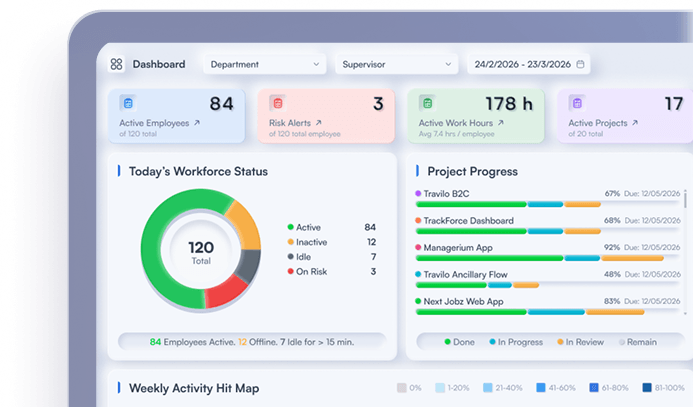
TrackForce combines time and activity visibility with application and website insight, workload reporting, productivity trends and role-based access. Managers can use those capabilities to investigate patterns, identify workflow friction and understand capacity across remote teams.
The platform should be configured around a documented purpose. Organizations can select the monitoring controls that fit their policy, restrict detailed data to authorized roles and review activity alongside tasks, workload and outcomes.
Explore TrackForce's remote employee monitoring guide for deployment considerations, or review the broader 2027 employee productivity monitoring software guide when evaluating platforms.
A Manager Checklist to Copy
Before completing a remote productivity review, confirm:
- The role's expected outcomes are written clearly.
- Measures cover output, quality and timeliness.
- Activity data is supporting context, not the main verdict.
- The reporting period is long enough to show a pattern.
- Workload, complexity and dependencies were reviewed.
- Meetings and offline work were considered.
- Comparisons involve genuinely similar work.
- The employee can explain or correct the evidence.
- Only authorized roles can see detailed records.
- The resulting action will improve performance or working conditions.
If several items are missing, the assessment is not ready to support a consequential decision.
Measure Results, Understand Patterns and Preserve Trust
The best answer to how to assess remote team productivity is not more observation. It is better evidence.
Define useful outcomes, select balanced measures and use activity information only to understand the conditions behind the result. Review trends, include employee context and act on workflow problems as well as individual development needs.
This gives leaders the visibility required to manage distributed work while leaving employees room to do that work responsibly.
Book a TrackForce demonstration to test a remote productivity framework using your team's roles, schedules and privacy requirements.
Frequently Asked Questions
How Do You Measure Remote Team Productivity?
Measure role-specific output, quality, timeliness, workload and customer or business impact. Use time and activity information as supporting context rather than the sole productivity score.
Is Employee Activity the Same as Productivity?
No. Activity shows interactions such as time, application use or device input. Productivity considers the useful output and outcomes produced with the available resources.
What Is Overmonitoring?
Overmonitoring occurs when an organization collects, reviews or retains more employee data than a legitimate purpose requires. It may also occur when activity records are used to support conclusions they cannot reliably prove.
Should Remote Employees Be Told About Monitoring?
Routine monitoring should normally be explained clearly before it begins. Employees should understand what is collected, why it is needed, when collection occurs, who can access it and how it may affect decisions. Specific legal requirements vary by location.
Can TrackForce Measure Remote Team Productivity?
TrackForce provides time, activity, application, website, workload and productivity reporting that can support remote team assessment. Managers should combine these signals with role-specific outputs, quality, timeliness and employee context.
Similar blog you can explore
Workforce Analytics Software: Alerts, Reporting and Governance
Active and Idle Time Reporting: How to Interpret Work Patterns
Employee Monitoring Software Privacy Checklist for 2027
Start Your 30-Day
Free TrackForce Trial