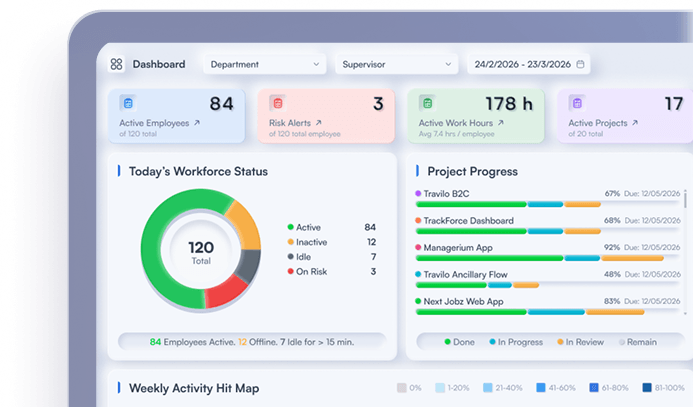
Employee Performance Monitoring Tools:
What They Measure
2026-11-05
•
Author: TrackForce Team
•
~1 min read
•
Updated November 5, 2026
- Quick Answer: What Do Employee Performance Monitoring Tools Measure?
- Monitoring Data vs Performance Evidence
- The 9 Signals Employee Performance Monitoring Tools Track
- —1. Working Time and Attendance
- —2. Active and Idle Time
- —3. Application and Website Usage
- —4. Tasks, Projects and Time Allocation
- —5. Workload and Capacity
- —6. Screenshots and Screen Activity
- —7. Output and Completion
- —8. Quality, Rework and Timeliness
- —9. Trends and Exceptions
- What Productivity Monitoring Tools Cannot Measure by Themselves
- How to Choose Employee Performance Monitoring Tools
- —Does the Tool Support the Decision You Need to Make?
- —Can You Separate Activity From Outcomes?
- —Are Controls Configurable?
- —Can Employees See and Challenge Their Data?
- —Does Reporting Work at Team and Trend Level?
- —Does It Fit Your Locations and Policies?
- A Responsible Rollout Checklist
- How TrackForce Connects Monitoring With Performance Context
- Frequently Asked Questions
- —What are employee performance monitoring tools?
- —What is the difference between monitoring and performance management?
- —Can active time measure employee performance?
- —Are productivity monitoring tools legal?
- —Which metrics should managers use for performance reviews?
- Measure Work to Improve It
Employee performance monitoring tools collect information about when work happens, how employees use digital systems, and where operational patterns change. Depending on the platform, they may record working hours, attendance, active and idle periods, applications, websites, tasks, projects, screenshots, and team workload.
That sounds like performance measurement, but most of those records describe activity. They do not independently prove quality, judgement, customer value, or completed business outcomes.
The practical question is not simply, “What can this tool track?” It is, “Which decisions can this data support fairly?”
Quick Answer: What Do Employee Performance Monitoring Tools Measure?
Most employee performance monitoring tools measure some combination of:
- Working time and attendance
- Active and idle time
- Application and website usage
- Tasks and project allocation
- Workload and capacity
- Screenshots or screen activity
- Output and completion
- Quality and rework
- Trends across employees, teams and periods
The first six areas provide operational context. Output, quality and business results provide stronger performance evidence. A responsible system connects both layers instead of converting activity into an automatic employee score.
Monitoring Data vs Performance Evidence
Monitoring data records an event. Performance evidence helps a manager evaluate whether valuable work was delivered to the expected standard.
| Data type | Example | What it can show | What it cannot prove alone |
| Presence | Clock-in and clock-out | When work was recorded | Quality or value |
| Activity | Active and idle periods | Device interaction patterns | Effort or productivity |
| Tool usage | Time in applications | Workflow and software use | Whether the work was useful |
| Workflow | Task and project time | Allocation and possible bottlenecks | Final outcome quality |
| Output | Cases or tasks completed | Quantity of relevant work | Accuracy or customer impact |
| Outcome | Quality, timeliness, customer result | Whether work achieved its purpose | Every cause behind the result |
The U.S. Office of Personnel Management describes quality, quantity, timeliness and cost-effectiveness as general performance measures. That is a stronger measurement foundation than active time alone.
For a fuller explanation, see TrackForce’s guide to workforce analytics versus employee monitoring.
The 9 Signals Employee Performance Monitoring Tools Track
1. Working Time and Attendance
Time records may include clock-in, clock-out, total tracked hours, breaks, late starts and work outside scheduled hours. These records support attendance, payroll inputs, shift coverage and capacity planning.
Time can answer whether someone was recorded as available. It cannot show assignment difficulty or result quality. Longer hours can also reveal overload, poor processes or unrealistic deadlines.
2. Active and Idle Time
Active time usually reflects keyboard or mouse interaction. Idle time records periods without detected device input. These signals can help teams find technical interruptions, extended inactivity or unusual changes in work patterns.
Reading, planning, meetings and offline review may create little device activity while still producing valuable work. Treat active and idle time as diagnostic signals, not direct measures of employee value.
3. Application and Website Usage
Productivity monitoring tools commonly report which applications and websites are used and for how long. This data may reveal duplicate tools, low software adoption, workflow switching or time lost in an unreliable system.
Global “productive” and “unproductive” labels are risky. A video platform may be essential for a marketing employee and irrelevant to a finance role. Classifications should reflect job responsibilities and should remain reviewable.
4. Tasks, Projects and Time Allocation
Task and project tracking connects time with actual assignments. Managers can compare planned and recorded effort, see which projects consume capacity and identify work that remains blocked.
This layer adds purpose. Three hours in a spreadsheet means little by itself. Three hours allocated to month-end reconciliation has operational meaning.
TrackForce’s guide to employee task tracking explains how task movement becomes a performance signal without turning every checklist item into a score.
5. Workload and Capacity
Workload reports show how assignments, working time and available capacity are distributed across a team. They can help identify employees who are overloaded, underallocated or repeatedly dependent on another person or process.
This is one of the most useful management views because it changes the question from “Who looks inactive?” to “Is work allocated realistically?” A sustained increase in hours alongside falling delivery may indicate a capacity problem rather than low effort.
6. Screenshots and Screen Activity
Some tools capture screenshots, screen recordings or detailed activity histories. These features may support a documented security, compliance, troubleshooting or customer requirement.
They also create greater privacy risk. Buyers should check whether captures can be disabled, scheduled, blurred, limited by role and protected through access controls and retention rules.
The UK Information Commissioner’s Office says worker monitoring should be lawful, fair and transparent, use no more information than necessary and allow workers to challenge inaccurate conclusions. Its worker-monitoring guidance is a useful design reference, although legal requirements vary by jurisdiction.
7. Output and Completion
Output measures completed units of relevant work, such as resolved cases, processed applications, delivered milestones or completed orders. It connects activity with something the role exists to produce.
Raw quantity still needs interpretation. Twenty complex cases cannot always be compared with twenty simple cases. Output should be grouped by role and, where practical, adjusted for complexity or priority.
8. Quality, Rework and Timeliness
Quality measures may include first-pass acceptance, error rate, defect rate, customer satisfaction or work returned for correction. Timeliness may include on-time delivery, cycle time or service-level achievement.
These measures often predict results better than device activity because they describe what the work produced. Use TrackForce’s guide to employee performance metrics to build a balanced scorecard covering delivery, quality, workload and impact.
9. Trends and Exceptions
Trend reporting compares patterns across days, weeks, teams, roles or projects. It can reveal rising overtime, falling delivery, increasing rework or workload imbalance.
Good employee performance monitoring tools help managers investigate exceptions without treating one unusual day as a verdict. A four-week pattern generally supports a better conversation than one screenshot or idle period.
What Productivity Monitoring Tools Cannot Measure by Themselves
Even advanced software cannot independently determine:
- whether a creative idea was original or useful;
- the difficulty of a customer, case or assignment;
- the value of mentoring and knowledge sharing;
- whether a meeting produced a good decision;
- the reason an employee’s activity changed;
- customer or revenue impact without connected business data;
- whether a manager set realistic goals;
- whether a workflow or system caused the delay.
This is why measuring employee productivity without micromanaging requires role-specific outcomes, transparent rules and regular conversations.
How to Choose Employee Performance Monitoring Tools
Use these questions during vendor demonstrations and pilots.
Does the Tool Support the Decision You Need to Make?
Begin with one question, such as “Why is cycle time rising?” Ask the vendor to demonstrate that workflow.
Can You Separate Activity From Outcomes?
The system should allow managers to review time and activity beside tasks, workload, delivery and quality. An opaque productivity score may hide assumptions that do not fit every role.
Are Controls Configurable?
Check schedules, screenshot settings, app and website classifications, role-based permissions, data retention, employee access, exports and audit records. The platform should support proportionate collection rather than forcing maximum surveillance.
Can Employees See and Challenge Their Data?
Employees need a practical route to explain context and request correction before information affects a performance decision.
Does Reporting Work at Team and Trend Level?
Routine management questions often need aggregated patterns rather than constant individual inspection. Look for team, department, project and period comparisons that help managers improve staffing, workflow and tools.
Does It Fit Your Locations and Policies?
Monitoring rules differ by country, state, sector and work arrangement. Confirm applicable employment and privacy requirements with qualified advisers before rollout. Document the purpose, data fields, access, retention and permitted uses.
A Responsible Rollout Checklist
Before enabling employee performance monitoring tools, document:
- The exact business purpose
- The minimum data needed
- The employees, devices and hours in scope
- What employees will be told
- Who can access detailed records
- How long each data type is retained
- Which outcome metrics provide context
- How employees can correct or explain data
- Which decisions may use the information
- When the organisation will review necessity and effectiveness
Transparency does not make excessive monitoring appropriate. The aim is to answer a legitimate business question with the least intrusive data that can answer it.
How TrackForce Connects Monitoring With Performance Context
TrackForce brings together time and attendance, active and idle patterns, application and website insight, tasks, projects, workloads and reporting. Managers can review operational signals while connecting them to how work is assigned and delivered.
If delivery falls, a manager can examine workload, project allocation, tool use and time patterns before deciding what happened.
Explore TrackForce’s workforce analytics software guide or start a free trial to test the platform with a real management question.
Frequently Asked Questions
What are employee performance monitoring tools?
Employee performance monitoring tools collect and organise work-related data such as attendance, time, activity, applications, websites, tasks, projects and workload. The best systems connect these operational signals with delivery, quality and outcome measures.
What is the difference between monitoring and performance management?
Monitoring records work events and activity signals. Performance management sets goals, evaluates results, supports feedback and plans development. Monitoring data can support performance management, but it should not replace outcome evidence or managerial judgement.
Can active time measure employee performance?
No. Active time indicates device interaction. It does not independently measure work quality, difficulty, timeliness or customer value. Use it as context beside role-specific outcome metrics.
Are productivity monitoring tools legal?
The answer depends on the location, industry, workforce and data collected. Employers generally need a legitimate purpose, proportionate collection, transparency, appropriate security and compliance with applicable employment and privacy laws. Obtain local legal advice before implementation.
Which metrics should managers use for performance reviews?
Choose three to five role-specific measures covering output, quality, timeliness, workload and business or customer impact. Review trends and employee context instead of relying on one activity score.
Measure Work to Improve It
Employee performance monitoring tools are most useful when they turn scattered work signals into better questions. Time, activity and application data can reveal patterns. Tasks and workload provide context. Delivery, quality and business outcomes show whether the work achieved its purpose.
The goal is not to collect every possible event. It is to create enough reliable evidence to remove bottlenecks, allocate work fairly, coach employees and improve results without mistaking visibility for performance.
Similar blog you can explore
How to Increase Employee Productivity: A Manager's Playbook
Lattice vs 15Five vs TrackForce: Process, Opinion or Evidence?
Employee Performance Management in South Africa: Poor Performance and Fair Process
Start Your 30-Day
Free TrackForce Trial