Remote Team Activity Reporting
Software Comparison: 2027
2026-11-09
•
Author: TrackForce Team
•
~1 min read
•
Updated November 9, 2026
- Quick Comparison of Remote Team Activity Reporting Software
- What Remote Team Activity Reporting Software Should Actually Report
- 1. TrackForce: Best for Connecting Activity to Performance Context
- —Where TrackForce stands out
- 2. ActivTrak: Best for Workforce and Technology Analytics
- —Where ActivTrak stands out
- 3. Hubstaff: Best for Time, Projects and Operational Administration
- —Where Hubstaff stands out
- 4. Time Doctor: Best for Detailed Time and Attendance Reports
- —Where Time Doctor stands out
- 5. Insightful: Best for Digital Work Patterns and Flexible Deployment
- —Where Insightful stands out
- How to Choose the Right Platform for 2027
- —1. Start with the management decision
- —2. Separate activity from performance
- —3. Check privacy and access controls
- —4. Run a representative pilot
- Which Remote Team Activity Reporting Software Is Best?
- Frequently Asked Questions
- —What is remote team activity reporting software?
- —What should remote team activity reports include?
- —Can activity reporting software measure employee performance?
- —Is remote employee activity reporting legal?
- —How should a company compare remote productivity reporting tools?
- Turn Visibility Into Better Decisions
Remote managers need visibility, but more data does not automatically create better management. The right remote team activity reporting software should show how work time is used, where workloads are becoming uneven, which tools create friction and whether delivery patterns are improving. It should not turn one activity score into a final judgement about performance.
This 2027 comparison reviews five platforms: TrackForce, ActivTrak, Hubstaff, Time Doctor and Insightful. Each serves a different operating model. Some emphasize workforce analytics, some begin with time tracking and some provide deeper activity records. The best choice depends on the decisions your managers need to make and the level of monitoring your organization can justify.
Product features and plan availability can change. Confirm critical requirements, data locations, integrations and pricing directly with each vendor before purchasing.
Quick Comparison of Remote Team Activity Reporting Software
| Platform | Best for | Reporting strengths | Consider carefully |
| TrackForce | Teams that want activity, workload and performance context in one system | Daily, monthly, project, workload, meeting and productivity reporting | Define which records support operational review and which support performance decisions |
| ActivTrak | Organizations focused on workforce and technology analytics | Team productivity, workload, focus, utilization and location analysis | Advanced analytics and package availability should be confirmed for the intended plan |
| Hubstaff | Distributed teams connecting time with projects, budgets and payroll | Time, activity, apps, URLs, work sessions, utilization and project reports | Activity rates need role context and should not become universal performance scores |
| Time Doctor | Remote operations needing detailed time and attendance reporting | Hours, attendance, projects, tasks, timelines, web and app usage, and unusual activity | Some reports and analytics are limited to particular plans or add-ons |
| Insightful | Teams analyzing digital work patterns and workflows | Activity timelines, apps, websites, productivity labels, alerts and scheduled reports | Decide whether visible or stealth deployment is legally and culturally appropriate |
What Remote Team Activity Reporting Software Should Actually Report
The category includes more than screenshots or a list of websites. Useful software should organize signals into reports that help a manager decide what to do next.
Look for five reporting layers:
- Time and availability: working hours, attendance, late starts, breaks and schedule coverage.
- Activity context: active and idle patterns, applications, websites and digital work categories.
- Work context: tasks, projects, assignments, workload and deadlines.
- Trend analysis: changes by week, month, team, role or location.
- Outcome evidence: quality, completion, service level or business results imported from relevant systems.
No platform can infer the value of every task from keyboard or mouse activity. A designer reviewing a layout, a developer reading documentation and a manager holding a customer call may show limited device interaction while producing valuable work. For this reason, remote team activity reports should provide evidence for investigation, not an automatic verdict.
TrackForce explains this distinction in its guide to measuring employee productivity without micromanaging. Managers who need dashboard design guidance can also review the nine metrics a team productivity dashboard should track.
1. TrackForce: Best for Connecting Activity to Performance Context
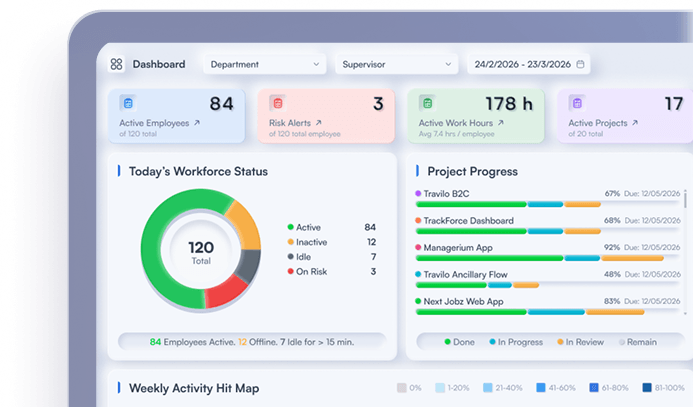
TrackForce is designed for managers who want one view of employee activity, productivity patterns, workload and performance evidence. Its current features page documents live tracking, productivity graphs, workflow overviews, usage logs, team comparisons, app and website insights, workload analysis, activity summaries and custom reports.
The reporting layer includes daily and monthly reports, project reports, team workload, meeting reports and productivity trends. TrackForce also provides configurable monitoring controls and role-based access, which matter when different managers should see different levels of detail.
Where TrackForce stands out
- A centralized dashboard for activity and productivity visibility
- App, website, task, project and workload context
- Daily, monthly, project and meeting reporting
- Team comparison and trend analysis
- Configurable collection and access controls
- A direct path from operational evidence to performance conversations
TrackForce is a strong fit when management needs to understand why a result changed, not merely whether a timer was running. Teams can use activity patterns to investigate workflow friction, review workload before judging an individual and attach evidence to coaching or performance reviews.
The main implementation requirement is governance. Decide which data supports scheduling, which data helps diagnose processes and which evidence may be considered in a formal review. TrackForce's guide to workforce analytics versus employee monitoring provides a useful framework for drawing that line.
Best fit: Remote and hybrid teams that want unified visibility across work activity, workload, productivity and reporting.
2. ActivTrak: Best for Workforce and Technology Analytics
ActivTrak focuses heavily on workforce analytics. Its official dashboards and reports cover organization overviews, team management, productivity trends, focus and collaboration, workload patterns, application use and productivity by location.
The platform can help leaders compare remote, office and hybrid work patterns, identify overutilized or underutilized teams and examine how digital tools affect focus. ActivTrak is therefore well suited to organizations asking broad questions about capacity, technology use and workplace policy.
Where ActivTrak stands out
- Executive and organizational productivity views
- Workload and utilization analysis
- Focus, collaboration and application-use insights
- Remote, office and hybrid location comparisons
- Historical trends and goal tracking
The platform's breadth means buyers should map desired reports to the correct package before signing. It is also important to define who owns interpretation. Even a sophisticated analytics view needs role, project and business context.
Best fit: Mid-sized and larger organizations that prioritize workforce planning, utilization and digital-work analytics.
3. Hubstaff: Best for Time, Projects and Operational Administration
Hubstaff combines time tracking with productivity monitoring, workforce analytics, budgets, invoicing and payroll-related workflows. Its official feature overview lists automated timesheets, app and URL usage, idle-time detection, optional screenshots, project costs, capacity planning and more than 20 reports.
This makes Hubstaff practical for agencies, contractors and distributed operations where managers need to connect recorded time with client work, project budgets or payroll processes.
Where Hubstaff stands out
- Automated and interactive time tracking
- Project, task and work-session reports
- App and URL usage with activity context
- Optional screenshots and configurable controls
- Budgets, invoicing and operational reporting
- Remote versus office productivity insights
Activity percentage should be treated cautiously. Keyboard and mouse input varies by role, device and task. A fair review combines time and activity with completed work, quality and project complexity.
Best fit: Distributed teams that need dependable time records tied to projects, costs, invoicing or payroll workflows.
4. Time Doctor: Best for Detailed Time and Attendance Reports
Time Doctor provides extensive reports for remote and hybrid teams. Its official reporting documentation lists activity summaries, attendance, hours tracked, projects and tasks, timelines, web and app usage, office versus remote analysis, meeting insights and unusual activity reports.
Managers can review start and end times, breaks, active and idle patterns, tracked hours and work by project. This makes the platform useful for operations that depend on attendance, schedules and time allocation.
Where Time Doctor stands out
- Detailed hours and attendance reporting
- Project and task time analysis
- Day and week timeline views
- Web and application usage reports
- Office versus remote comparisons
- Exportable reporting for operational review
Some capabilities require specific plans or add-ons, so buyers should build a must-have report list before evaluating cost. Teams should also avoid treating unusual activity flags as proof of misconduct without human review.
Best fit: Remote operations that need granular time, attendance and project reporting with structured exports.
5. Insightful: Best for Digital Work Patterns and Flexible Deployment
Insightful combines employee monitoring with workforce and workflow analytics. Its official employee monitoring page describes app and website use, active and idle time, productivity labels, alerts, raw activity data and daily, weekly or monthly email reports.
The platform supports visible deployment and, for company computers, optional stealth deployment. It also provides manager and employee logins, which can help organizations create different access levels and give employees visibility into their own records.
Where Insightful stands out
- Detailed digital activity timelines
- Application and website reporting
- Productivity labels and alerts
- Scheduled email reports
- Manager and employee access
- Visible and company-device deployment options
Stealth monitoring can create significant legal and trust risks. Availability does not mean suitability. Obtain jurisdiction-specific advice, document a legitimate purpose and choose the least intrusive configuration that meets the need.
Best fit: Desk-based teams that need detailed work-pattern analysis and configurable deployment modes.
How to Choose the Right Platform for 2027
Use a structured evaluation instead of selecting the tool with the longest feature list.
1. Start with the management decision
Write down the questions managers must answer. Examples include:
- Which team is overloaded?
- Where are projects losing time?
- Are scheduled hours being covered?
- Which tools create repeated switching?
- Is a process change improving delivery?
Every report should support a defined decision. If nobody can explain what action a field enables, that field may not need to be collected.
2. Separate activity from performance
Activity reports explain how digital work happened. Performance requires output, quality, timeliness and impact. Choose remote team activity reporting software that can connect operational signals with tasks, projects, workload or imported business outcomes.
For a deeper buying framework, use TrackForce's 2027 employee productivity monitoring software evaluation guide.
3. Check privacy and access controls
Evaluate collection schedules, role-based access, employee visibility, retention, screenshot controls, exports and auditability. The UK's Information Commissioner's Office guidance warns that excessive monitoring can intrude into private life and says organizations must balance their interests with workers' rights. Acas guidance also recommends consultation, a clear policy and an impact assessment.
Requirements differ by country and state. Get qualified legal advice before deployment, especially for screenshots, keystrokes, communications, location data, personal devices or automated employment decisions.
4. Run a representative pilot
Test two or three platforms with a small, representative group. Include managers and employees in the review. Score each platform on:
- report usefulness;
- data accuracy;
- setup effort;
- manager interpretation;
- employee clarity;
- privacy configuration;
- integrations;
- export quality;
- support;
- total cost.
Use the same scenarios for every vendor. A fair pilot reveals whether a polished demo turns into better weekly decisions.
Which Remote Team Activity Reporting Software Is Best?
There is no universal winner. The best choice depends on the operating problem:
- Choose TrackForce when you want activity, workload and performance context in one reporting environment.
- Choose ActivTrak when workforce optimization, utilization and technology analytics are the priority.
- Choose Hubstaff when time records must connect with projects, budgets, invoicing or payroll.
- Choose Time Doctor when detailed attendance, hours and timeline reporting lead the evaluation.
- Choose Insightful when digital work-pattern visibility and flexible deployment are central requirements.
For teams evaluating TrackForce, review the current TrackForce pricing and trial options and test the platform with real management questions. A successful pilot should reduce status chasing, reveal actionable patterns and improve the quality of performance conversations.
Frequently Asked Questions
What is remote team activity reporting software?
Remote team activity reporting software collects work-related signals such as time, attendance, active and idle patterns, application use, website use, tasks and projects. It organizes those signals into reports that help managers understand workload, workflow and productivity trends.
What should remote team activity reports include?
Useful reports include scheduled and recorded time, workload, task or project context, application patterns, trend comparisons and relevant business outcomes. They should also show data definitions and allow managers to investigate context before making a decision.
Can activity reporting software measure employee performance?
It can provide evidence related to performance, but activity alone does not prove quality, value or results. Managers should combine activity with role-specific outcomes, quality, timeliness, workload and employee context.
Is remote employee activity reporting legal?
Legality depends on jurisdiction, purpose, data type, notice, proportionality and implementation. Employers should use a clear policy, collect only necessary data, restrict access and obtain qualified legal advice for every applicable location.
How should a company compare remote productivity reporting tools?
Define the decisions the system must support, create a must-have report list and run a representative pilot. Compare accuracy, usefulness, privacy controls, integrations, employee transparency, support and total cost rather than counting features alone.
Turn Visibility Into Better Decisions
The best remote team activity reporting software does not ask managers to stare at more data. It turns time, activity, applications, tasks and workload into a reliable starting point for action.
Choose a platform that matches your operating model, gives employees clear rules and helps managers distinguish activity from performance. For teams that want unified reporting with configurable controls and performance context, explore TrackForce or start a focused trial with one team and a defined set of questions.
Similar blog you can explore
Employee Monitoring Software Privacy Checklist for 2027
Employee Productivity Monitoring Software: 2027 Evaluation Guide
Employee Performance Monitoring Tools: What They Measure
Start Your 30-Day
Free TrackForce Trial