Employee Productivity Monitoring Software:
2027 Evaluation Guide
2026-11-08
•
Author: TrackForce Team
•
~1 min read
•
Updated November 8, 2026
- Quick Answer: How Should You Evaluate Productivity Monitoring Software?
- What Employee Productivity Monitoring Software Actually Is
- What Changes in a 2027 Evaluation?
- —AI Outputs Need Explainability and Human Review
- —Hybrid Work Requires Context, Not Location Bias
- —Employee Access Becomes an Evaluation Requirement
- —Monitoring Controls Matter as Much as Monitoring Features
- —Productivity Must Connect to Outcomes
- A 100-Point Evaluation Scorecard
- 12 Questions to Ask Every Vendor
- —1. What Business Decision Will This Feature Improve?
- —2. What Does the Software Measure Directly?
- —3. Can It Connect Activity to Tasks and Outcomes?
- —4. Can Metrics Be Defined by Role?
- —5. Which Features Can Administrators Limit?
- —6. What Can Employees See?
- —7. How Are AI Insights Produced and Challenged?
- —8. Who Can Access Detailed Records?
- —9. How Long Is Each Data Type Retained?
- —10. Does It Show Trends Instead of Isolated Events?
- —11. What Integrations and Exports Are Available?
- —12. What Happens After Purchase?
- Red Flags During a Vendor Demonstration
- Run a 30-Day Pilot Before Choosing
- —Week 1: Define the Baseline
- —Week 2: Test Data Quality
- —Week 3: Make One Management Change
- —Week 4: Evaluate the Result
- Where TrackForce Fits
- Frequently Asked Questions
- —What is employee productivity monitoring software?
- —What features should productivity monitoring software have in 2027?
- —Can employee monitoring software measure productivity accurately?
- —How should a company compare productivity monitoring platforms?
- —Is employee productivity monitoring software legal?
- Choose Evidence, Not Maximum Visibility
Choosing employee productivity monitoring software for 2027 is not a contest to find the platform that captures the most activity. The better question is whether the software produces reliable evidence for the decisions managers actually need to make.
Can it reveal workload imbalance before deadlines slip? Can it distinguish application activity from completed work? Can employees understand and challenge the data? Can administrators limit collection by purpose, role and schedule?
This guide provides a structured framework covering measurement quality, operational fit, privacy, security and reporting, including a 100-point scorecard and pilot plan.
Quick Answer: How Should You Evaluate Productivity Monitoring Software?
Evaluate employee productivity monitoring software across nine areas:
- Business purpose and use-case fit
- Measurement model
- Connection between activity and outcomes
- Privacy and collection controls
- Employee transparency and access
- Security and data governance
- Reporting and workforce analytics
- Integrations and deployment
- Support, adoption and total value
Do not select a platform from a polished dashboard alone. Run the same real management scenario through each shortlisted tool and compare whether it helps the team reach a fair, useful decision.
What Employee Productivity Monitoring Software Actually Is
The category combines several types of workplace technology.
Employee monitoring software records work-related events such as attendance, active and idle periods, applications, websites, screenshots or device activity.
Employee productivity software organises work signals into productivity trends, workloads, tasks, projects and reports.
Workforce analytics software identifies patterns across teams, roles, tools and periods to support planning and process improvement.
Performance management software manages goals, reviews, feedback, ratings and development plans.
One platform may cover parts of all four categories. The operating model matters more than the label. TrackForce’s guide to employee performance monitoring tools explains what software can and cannot prove.
What Changes in a 2027 Evaluation?
The core principles remain stable, but buyers should place greater weight on five areas.
AI Outputs Need Explainability and Human Review
AI may classify applications, identify exceptions or generate productivity insights. Ask which data produces each output and whether a manager can reject it.
An automated score should never hide its assumptions. The UK Information Commissioner’s Office says meaningful human oversight requires people to remain critical and able to challenge automated recommendations, especially when decisions may significantly affect workers.
Hybrid Work Requires Context, Not Location Bias
Office, remote and field work create different digital patterns. Compare employees against role-relevant outcomes and representative baselines, not location-based activity assumptions.
Employee Access Becomes an Evaluation Requirement
Employees should see the information used to describe their work, add context and challenge inaccurate records.
Monitoring Controls Matter as Much as Monitoring Features
Buyers should evaluate what can be disabled, limited or restricted. Strong controls include schedules, role-based access, screenshot configuration, retention settings, exclusions and different policies for different teams.
Productivity Must Connect to Outcomes
Hours, active time and application use are operational signals. Performance also requires output, quality, timeliness and business impact. The U.S. Office of Personnel Management uses quality, quantity, timeliness and cost-effectiveness as general performance dimensions.
A 100-Point Evaluation Scorecard
Use the same weights for every shortlisted platform. Adjust them before demonstrations, not after seeing a preferred product.
| Evaluation area | Weight | What good looks like |
| Business fit | 15 | Solves a defined management problem for the target roles |
| Measurement model | 15 | Separates presence, activity, workflow and outcomes |
| Context and outcomes | 15 | Connects signals to tasks, workload, quality or delivery |
| Privacy controls | 15 | Supports proportionate, configurable collection |
| Transparency | 10 | Employees can understand, access and challenge data |
| Security and governance | 10 | Clear permissions, retention, audit and data handling |
| Analytics and reporting | 10 | Useful trends, team views, exceptions and exports |
| Integration and deployment | 5 | Fits devices, identity, HR, project and reporting systems |
| Support and value | 5 | Sustainable adoption, service quality and clear total cost |
Score each area from 1 to 5, multiply by its weight and divide by 5. A high total does not remove the need for legal, security and employee review.
12 Questions to Ask Every Vendor
1. What Business Decision Will This Feature Improve?
Start with decisions such as reallocating workload, finding workflow friction or supporting a coaching conversation. A feature without a decision may create data without value.
2. What Does the Software Measure Directly?
Ask the vendor to separate recorded facts from calculated classifications and inferred conclusions. A timestamp may be direct data. A productivity label is an interpretation.
3. Can It Connect Activity to Tasks and Outcomes?
Useful employee productivity monitoring software should help managers see what activity supported. Test whether a delivery problem can be reviewed beside workload, applications, projects and quality information.
4. Can Metrics Be Defined by Role?
A support agent, developer, salesperson and finance specialist should not share one universal productivity definition. Confirm that classifications, reports and success measures can reflect different responsibilities.
5. Which Features Can Administrators Limit?
Check whether the organisation can configure schedules, screenshots, URLs, applications, idle rules, device scope, user groups and retention. Avoid systems that force one intrusive setting across the whole workforce.
6. What Can Employees See?
Ask whether employees can view their time, activity, classifications, productivity trends and corrections. Hidden data creates avoidable disputes and weakens accountability.
7. How Are AI Insights Produced and Challenged?
Request a plain-language explanation of inputs, logic, limitations and human review. Ask what happens when an employee or manager disputes an AI-generated conclusion.
8. Who Can Access Detailed Records?
Test role-based permissions with realistic users. A line manager may need team trends without access to security investigations or another department’s individual records.
9. How Long Is Each Data Type Retained?
Retention should reflect a documented purpose. Ask whether screenshots, detailed events, time records and aggregated reports can have different retention periods.
The ICO’s worker-monitoring guidance emphasises purpose, transparency, minimisation, accuracy and appropriate retention. Laws vary by jurisdiction, so obtain qualified advice for each deployment.
10. Does It Show Trends Instead of Isolated Events?
One unusual day rarely proves a performance problem. Look for weekly and monthly trends, comparable baselines and team-level views. TrackForce’s guide to team productivity dashboards explains which measures belong together.
11. What Integrations and Exports Are Available?
Confirm operating systems, identity management, HR systems, project tools, APIs and exports. A platform cannot connect activity to outcomes if relevant task, quality or business data remains isolated.
12. What Happens After Purchase?
Evaluate onboarding, policy guidance, administrator training, employee communication, technical support and implementation ownership. Software adoption is an operating change, not only an installation.
Red Flags During a Vendor Demonstration
Pause the evaluation if a vendor:
- presents active time as a complete productivity score;
- cannot explain how classifications or AI outputs are calculated;
- recommends continuous screenshots without asking about purpose;
- offers no employee correction or challenge process;
- cannot restrict detailed records by role;
- uses one benchmark for unrelated jobs;
- avoids questions about retention or data location;
- demonstrates surveillance features but no workload or outcome context;
- promises that monitoring alone will increase productivity.
The strongest platform is not the one that makes every action visible. It is the one that gives managers enough trustworthy context to improve work without collecting unnecessary data.
Run a 30-Day Pilot Before Choosing
Week 1: Define the Baseline
Choose one team and one management problem. Document the current outcome and agree on what data will and will not be collected.
Week 2: Test Data Quality
Compare system records with actual schedules, tasks and employee explanations. Look for missing offline work, incorrect app classifications, time-zone errors and misleading idle periods.
Week 3: Make One Management Change
Use the evidence to rebalance assignments, remove a workflow step, change a meeting pattern or correct a tool issue. Do not judge the pilot by dashboard activity.
Week 4: Evaluate the Result
Check whether the original outcome improved. Collect employee and manager feedback, review administrative workload and score the vendor against the 100-point framework.
TrackForce’s guide to measuring employee productivity without micromanaging provides a balanced measurement model for the pilot.
Where TrackForce Fits
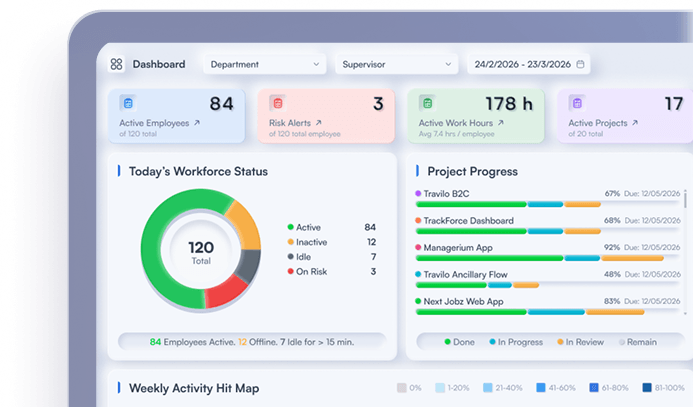
TrackForce positions its employee productivity monitoring software around real-time visibility into productivity, activity patterns and performance. Its current platform highlights active work, application usage, task behaviour, detailed reporting and workforce analytics.
The useful evaluation question is how those signals support a decision. During a TrackForce demonstration, test whether managers can identify an uneven workload, review productivity trends, understand application use and add task or performance context without treating screen time as the final result.
TrackForce also presents its approach as clarity without micromanagement. Buyers should verify that fit through their own configuration, policy and pilot. Explore TrackForce employee productivity software or compare the broader market in the guide to workforce analytics platforms.
Frequently Asked Questions
What is employee productivity monitoring software?
Employee productivity monitoring software records and organises work-related signals such as attendance, active time, applications, websites, tasks, workloads and trends. It should connect those signals to role-specific outcomes rather than treating activity as complete performance evidence.
What features should productivity monitoring software have in 2027?
Look for configurable collection, role-based access, employee visibility, explainable AI outputs, workload and trend reporting, task or outcome context, retention controls, integrations and reliable exports.
Can employee monitoring software measure productivity accurately?
It can measure operational signals accurately when configured well, but productivity also depends on output, quality, timeliness and impact. Use monitoring data as context inside a balanced measurement model.
How should a company compare productivity monitoring platforms?
Define one business problem, use a weighted scorecard, ask every vendor the same questions and run the same real-world pilot. Compare decision quality, not the number of features or dashboards.
Is employee productivity monitoring software legal?
Requirements depend on jurisdiction, industry, workforce arrangement, purpose and data collected. Employers should identify an appropriate legal basis, use proportionate methods, communicate clearly, protect the data and obtain qualified local advice.
Choose Evidence, Not Maximum Visibility
The best employee productivity monitoring software for 2027 will not be the platform that watches the most. It will be the platform that helps managers understand workload, workflow and changing performance with reliable context.
Define the decision first. Score every vendor consistently. Test the product with real work, invite employee feedback and check whether one management action improves the outcome. That is a stronger buying process than choosing from features alone.
Similar blog you can explore
Employee Monitoring Software Privacy Checklist for 2027
Remote Team Activity Reporting Software Comparison: 2027
Employee Performance Monitoring Tools: What They Measure
Start Your 30-Day
Free TrackForce Trial