Employee productivity software for South African teams.
Output, workload and project time in one place.
No credit card required · Start with one team · Plans from $4.99 a month
Built by AKIJ iBOS, part of AKIJ Resource · Offices in Dhaka and San Francisco
What managers get from TrackForce
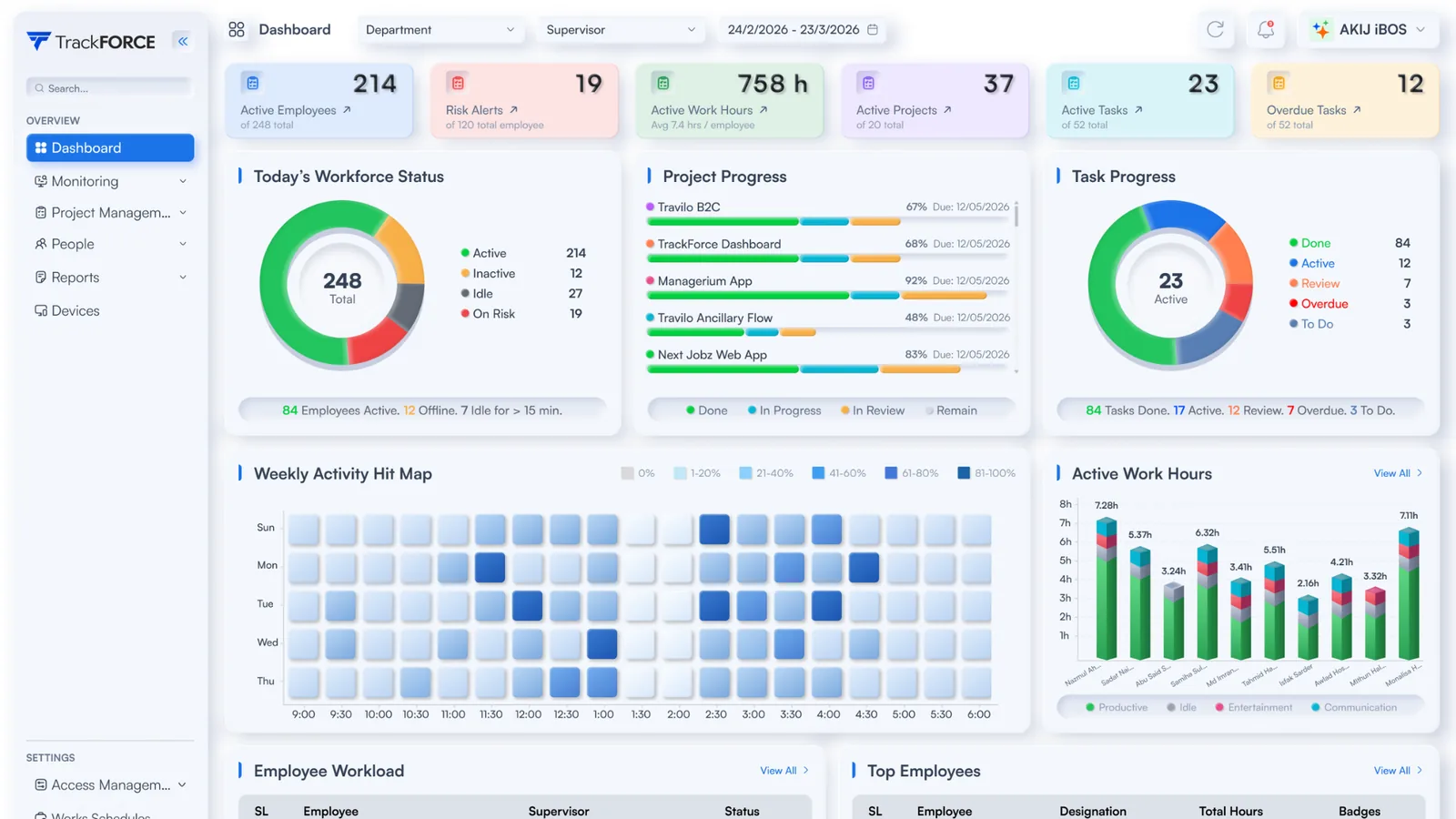
See delivery in context
Completed tasks, project progress and hours sit in one view, so a low number is read against the workload behind it.
Spot overload early
Each person carries an overloaded, balanced or underloaded status, and insights suggest where tasks could move before deadlines slip.
Choose what is captured
Screenshot intervals, keystroke logging and app tracking are set per device during setup, so capture can follow a written purpose.
From install to a workload view managers can act on
Three steps. Settings come first, so the data collected is the data you decided to collect.
Install and choose capture
Install the desktop app on Windows or Mac devices, then set screenshot intervals, keystroke logging and app tracking per device. Leave off anything the purpose does not need.
Organise teams and access
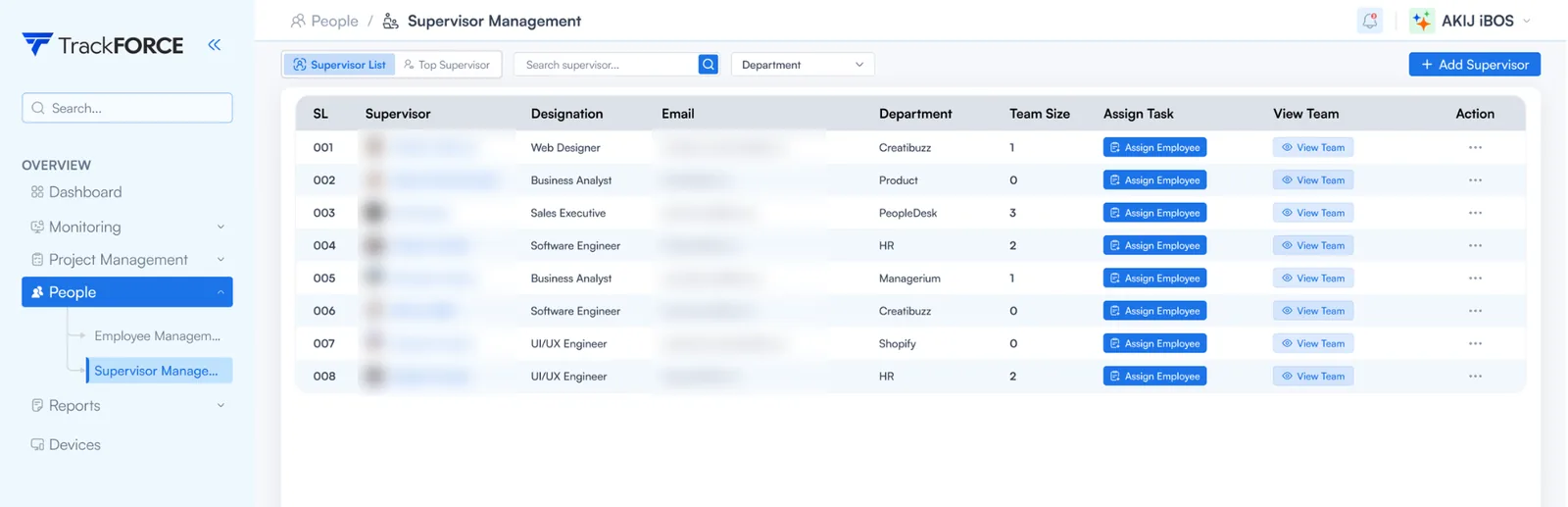
Import staff from Excel or CSV, tag them by department and assign supervisors. Managers and admins get separate roles and permissions.
Read output, then talk
Workload sits beside output for the whole period. The conversation starts from evidence rather than from the last fortnight.
 1234
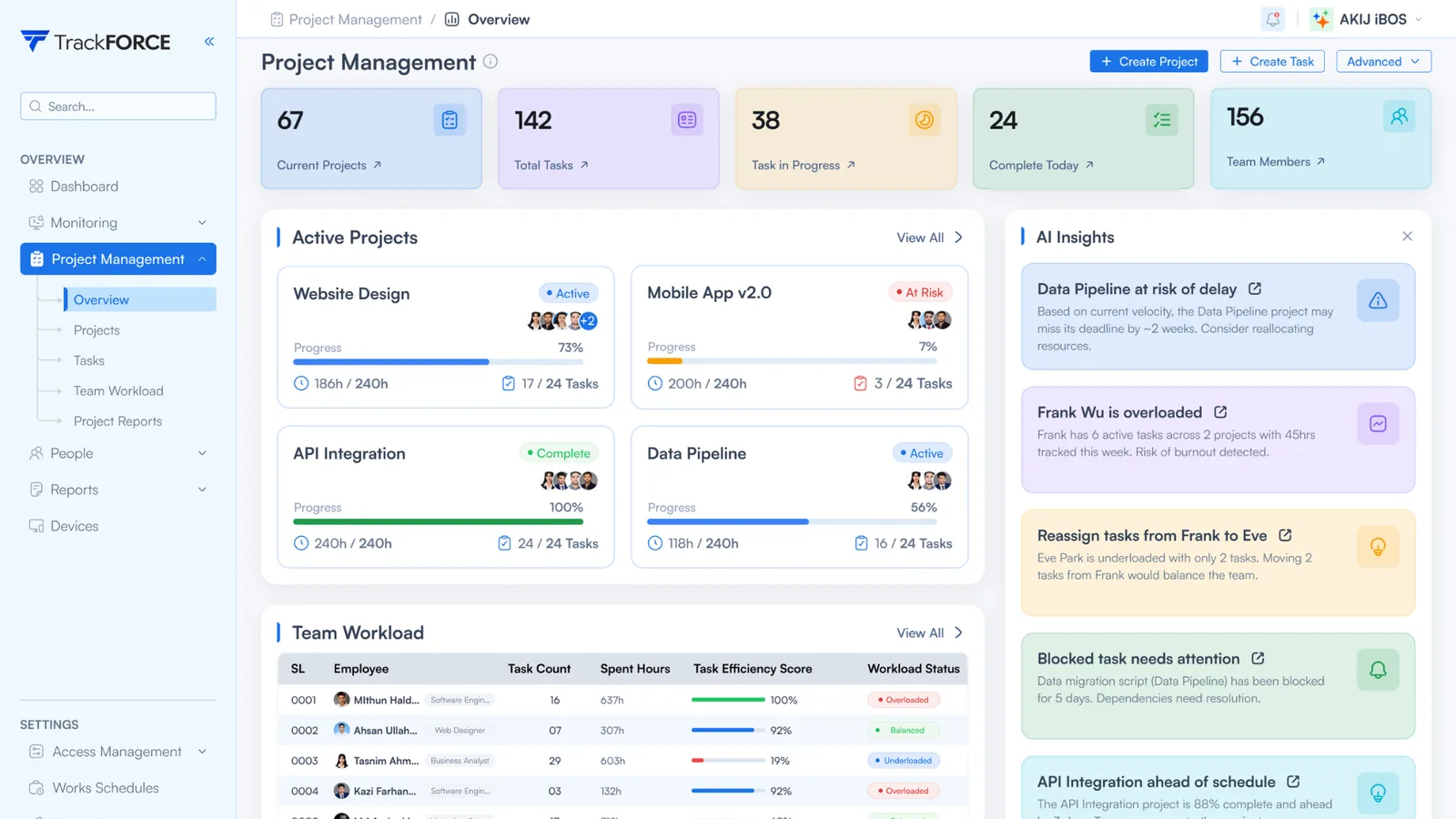
1234- Projects and tasks at a glance. Current projects, total tasks, work in progress and tasks completed today.
- Progress against hours. Each project shows completion beside hours used against hours planned.
- Team workload. Task count, hours spent, efficiency score and an overloaded, balanced or underloaded status per person.
- Insights. Flags delivery risk and overload, and suggests where tasks could move.
What POPIA asks before monitoring starts
The Protection of Personal Information Act applies to employee data like any other personal information, and the Information Regulator enforces it. Three provisions shape how a productivity tool should be set up. Capture is configured per device, and each organisation remains responsible for its lawful ground, employee notices, access controls and retention policy.
A lawful ground
Processing needs a ground such as consent, a contract, a legal obligation or the legitimate interests of the business. Where legitimate interests is the ground, an employee may object on reasonable grounds, and the processing must then stop.
Notice before collection
Staff must be made aware of what is collected, why, who is responsible, whether it is sent abroad, and their right to object and to complain to the Information Regulator. For direct collection, this happens before collection starts.
Only what the purpose needs
Personal information must be adequate, relevant and not excessive for its purpose, and kept no longer than the purpose requires. Capture settings and retention should both follow a written purpose.
Sales team, Johannesburg
Prepared before enrolment
- Purpose
- Balance workload and plan resources across accounts
- Lawful ground
- Legitimate interests, POPIA section 11(1)(f)
- Collected
- Completed tasks, workload status, working hours
- Not collected
- Keystrokes, screenshots and screen recordings, unless a written purpose needs them
- Staff notice
- Section 18 notice issued before enrolment
- Retention
- Set to the purpose, with time records kept as the BCEA requires
Before any device is enrolled
- Write down the purpose for each team.
- Start with output, workload and hours. Add screenshots or recordings only where a written assessment supports them.
- Give staff a section 18 notice that says what is measured, and why.
- Set a retention period and record the reason for it.
At the end of 2025 the Information Regulator began a compliance monitoring exercise that asks selected organisations for a POPIA compliance report within 14 business days (Bowmans, February 2026). Last reviewed: October 2026.
RICA and capture settings
The system controller must have “made all reasonable efforts to inform in advance” the people whose communications may be intercepted.
RICA, section 6, as set out by Michalsons
The Regulation of Interception of Communications and Provision of Communication-Related Information Act 70 of 2002 regulates the interception of communications and provides limited exceptions subject to specific conditions. These include the prior written consent of a party (section 5) and a business exception that depends on authorisation and advance notice (section 6). Features that may capture email, chat or other communication content should be assessed before activation, with appropriate notice, authorisation and legal guidance.
Email, chat and calls
Any feature that captures message content needs a RICA assessment and advance notice to every user before it is used.
Screenshots and screen records
TrackForce can capture screenshots and screen recordings, set per device. A screenshot can include an email or chat on screen, so assess the need and tell staff before switching them on.
Keystroke logging
Keystroke logging records what staff type, messages included. Keep it for devices where a written purpose needs it.
This is a reading of the statute, not legal advice. RICA offences carry fines of up to R2 million or imprisonment of up to 10 years, so take South African legal advice before capturing communication content.
Working hours, overtime and time records
The Basic Conditions of Employment Act 75 of 1997 sets the hours rules below. Most of them apply only to employees earning below the earnings threshold.
| Rule | What the Act says | What it means for measurement |
|---|---|---|
| Ordinary hours | 45 hours a week. 9 hours a day for a five-day week or less, 8 hours a day for a longer week (section 9). | Output targets have to be read against contracted ordinary hours, not against whatever hours happened to be logged. |
| Overtime | Only by agreement, up to 10 hours a week and no more than 12 hours of work on any day. Paid at least one and a half times the normal wage (section 10). | Overtime is judged by the day and the week, so the hours record needs both, not only a monthly total. |
| Meal intervals | 60 minutes after five hours of work, reducible to 30 minutes by written agreement (section 14). | A long day with breaks reads differently from a long day without them. |
| Records | Name, occupation, time worked and pay for each employee, kept for 3 years from the last entry (section 31). | Hours data should be retrievable per employee over three years. Confirm the retention period for your plan against this. |
| Earnings threshold | R269,600.90 a year from 1 May 2026, up from R261,748.45. Employees above it fall outside sections 9 to 16, among others. | One company can have staff inside and outside the hours rules, so measurement should follow each contract. |
TrackForce logs working hours per employee and shows output beside them, so long weeks and overtime are visible next to the work they produced. See our guide to employee monitoring software with time tracking.
What TrackForce helps managers do
Six everyday decisions the reports support. The desktop agent can also capture screenshots, screen recordings, keystrokes, app and website use and file transfers. Given POPIA and RICA, those settings belong only on devices where a written purpose needs them and staff have been told in advance.
Review the full period
Output per employee across the whole review period, so a review does not rest on the last fortnight.
Separate workload from performance
Volume carried sits beside output, so a low number reads correctly when the work was heavy.
Reallocate before deadlines slip
Each person shows as overloaded, balanced or underloaded, with insights on where tasks could move.
See where project time goes
Hours by project, which turns a reallocation argument into numbers.
Cut month-end reporting
Hours and workload build from everyday work, so reports do not wait on manual timesheets.
Capture settings per device
Screenshot interval, keystroke logging, app tracking and file transfer visibility are chosen per device, so collection can stay inside the stated purpose.
What to check in any productivity tool, and where TrackForce stands
Seven questions worth asking every vendor on your shortlist, with TrackForce’s own answers. A wider market view sits in our guide to the best workforce analytics software.
| What to check | TrackForce | Why it matters in South Africa |
|---|---|---|
| Output and workload reporting | Task efficiency, workload status and project progress per employee | POPIA expects data that is adequate, relevant and not excessive for the purpose |
| Working hours | Logged per employee by the desktop app and shown over the full period | The BCEA limits ordinary hours to 45 a week and overtime to 10 |
| Activity capture | Screenshots, keystroke logging, app and website use, file transfers, configured per device | Keystrokes and screenshots can reach communications, which RICA regulates |
| Visibility to staff | A login-based app staff sign in to. Centrally managed background deployment is also supported for IT-managed devices | POPIA section 18 and RICA section 6 both rely on staff being told in advance |
| Access control | Separate roles and permissions for managers and admins | Limits who can see individual data |
| Team structure | Staff tagged by department and assigned to supervisors | Keeps reporting lines clear across teams and sites |
| Retention | Confirm the retention period for your plan with TrackForce | POPIA says no longer than necessary, and the BCEA keeps time records for three years |
Answers reflect TrackForce’s published documentation. Ask any supplier the same seven questions, including TrackForce, and get the answers in writing.
Start with a free 30-day trial. Paid plans from $4.99 a month.
South African questions, answered before you ask
Does TrackForce need software on employees’ computers?
Yes. A desktop app runs on each Windows or Mac device, and admins manage everything from a web portal. Staff can be imported from Excel or CSV and grouped by department.
Capture settings such as screenshot intervals, keystroke logging and app tracking are chosen per device during setup.
Can staff see when TrackForce is running?
TrackForce offers a login-based app that staff sign in to and start themselves. For IT-managed devices, TrackForce also supports centrally managed deployment that runs in the background.
Before using background operation, confirm the lawful ground, staff notice and internal approval it needs. POPIA section 18 expects staff to be told what is collected before collection, and RICA section 6 relies on users being informed in advance.
Are screenshots optional?
Yes. Screenshot settings, including the interval, are chosen per device alongside keystroke logging and app tracking. A team that does not need screenshots can be set up without them.
Can managers and admins have different access?
Yes. Managers and admins are given separate roles and permissions in the web portal, which limits who can see individual-level data.
Is TrackForce priced in rand?
List prices are published in US dollars: Essential is $4.99 a month and Professional is $14.99 a month, with Custom priced on request. ZAR invoices are available on request for South African companies, and VAT may apply.
The 30-day trial needs no card and no currency decision.
Is employee monitoring legal in South Africa?
Yes, within limits. POPIA governs the personal information collected, which needs a lawful ground, a notice to staff before collection and no more data than the purpose needs. RICA separately governs the interception of communications such as email and chat.
Reporting output, workload and hours sits more comfortably inside those limits than capturing message content, which needs legal advice first.
Do employers need employee consent under POPIA?
Not always. Section 11 lists several grounds, including consent, a contract, a legal obligation and the legitimate interests of the business.
Where legitimate interests is the ground, an employee may object on reasonable grounds relating to their own situation, and the business may then no longer process that information.
Does RICA apply to monitoring work email?
It can. RICA regulates the interception of communications and allows limited exceptions. The section 6 business exception depends on authorisation by the system controller and on users being informed in advance or consenting. Assess any feature that may capture message content before activation, and take legal advice.
How long must working time records be kept?
Three years. Section 31 of the Basic Conditions of Employment Act requires records of each employee’s name, occupation, time worked and pay, kept for three years from the date of the last entry.
What is the BCEA earnings threshold in 2026?
R269,600.90 a year from 1 May 2026, up from R261,748.45. Employees earning above it are excluded from the BCEA rules on ordinary hours, overtime, meal intervals and rest periods, among others.
Start with one South African team for 30 days
Configure what is captured, review workload and working hours over a full month, and decide whether the evidence improves management decisions. No credit card required. Start with one team and review the results before expanding.
Free 30-day trial · No credit card required · Start with one team