
Keylogger vs Screenshot Monitoring: Which Gives You More Useful Productivity Data?
Keylogger vs Screenshot Monitoring: Which Offers Superior Productivity Insights?
Introduction
As organizations increasingly embrace remote work, the market for employee monitoring tools is rapidly expanding. Recent data indicates that over 80% of companies with remote or hybrid teams have adopted some form of digital monitoring software. This trend reflects the growing need for improved productivity tracking and security assurance. However, with a plethora of options available, choosing between keylogging and screenshot monitoring can be challenging.
This article will delve into the differences between keyloggers and screenshot monitoring tools, examining which provides more valuable data for boosting productivity. By the end of this discussion, you’ll have a clearer understanding of which methodology aligns best with your organization’s needs.
What Is Keylogger and Screenshot Monitoring?
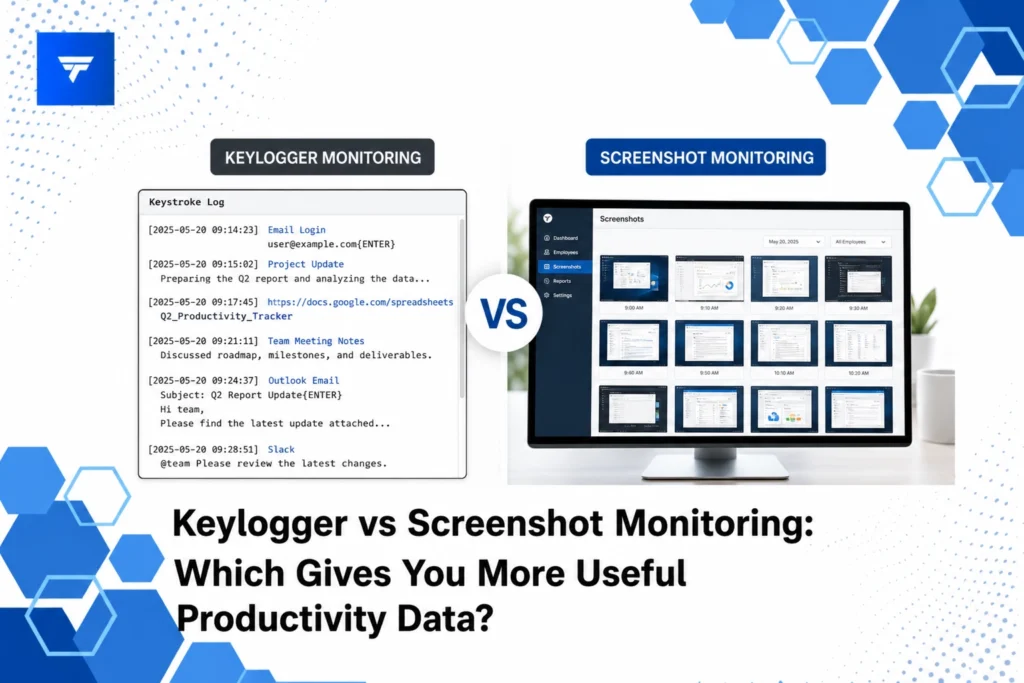
Keylogger software is designed to track and record every keystroke made on a computer. Often used for security purposes, it provides insights into user activity by capturing written communication, login credentials, and navigational decisions. While these features can be beneficial for monitoring sensitive information, keylogging can raise ethical concerns due to its invasive nature.
On the other hand, screenshot monitoring captures images of a user’s screen at regular intervals. This method offers a visual record of activity without capturing sensitive personal data like passwords. It provides an overview of the user’s engagement with different applications and websites, which can be pivotal for understanding workflow patterns and time management.
Both methods cater to different needs and have their specific use cases. Organizations must consider their monitoring goals, ethical boundaries, and legal requirements when deciding between these approaches.
Keylogger Monitoring: Insights and Use Cases
Security Tracking – Keyloggers are particularly valuable for industries handling confidential information. They enable IT teams to ensure compliance and prevent data leaks by monitoring unauthorized access to sensitive data. Companies in finance and healthcare frequently use keyloggers to protect proprietary information. The detailed logs allow security personnel to identify suspicious activity quickly.
Performance Analysis – For management teams seeking detailed insights into employee productivity, keyloggers can provide comprehensive data on workflow efficiency. By analyzing typing speed and patterns, managers can identify areas where training or support may be needed. Keylogging can help refine processes, leading to improved work output.
Parental Oversight – Outside the business domain, keyloggers are sometimes used for parental control to monitor children’s online activities, ensuring safe usage of digital platforms. This application helps in preventing exposure to inappropriate content and can safeguard against online threats.
Screenshot Monitoring: Insights and Use Cases
Transparency and Accountability – For HR managers, screenshot monitoring acts as a tool to uphold transparency within the organization. Screenshots provide a clear view of employee activity, which can help in setting expectations and boosting accountability. When employees know their screens are monitored, they are more likely to stay focused, reducing idle time significantly.
Workflow Optimization – Operations managers can utilize screenshot monitoring to analyze how employees allocate their time across different tasks. By reviewing the captured screens, inefficiencies such as excessive time spent on non-work-related websites can be identified and eliminated, streamlining operations. This visual insight is crucial for teams that manage multiple projects and require optimal time management.
Remote Work Management – In the context of remote work, screenshot monitoring reassures managers that teams are maintaining productivity. With an understanding of how distributed teams operate, managers can adjust resources or provide additional support as needed. This is essential for maintaining performance standards across remote environments.
For a comprehensive solution that integrates both keylogging and screenshot monitoring functionalities, explore TrackForce.
Key Features of Each Method: Insights from TrackForce
TrackForce offers advanced features tailored to the needs of modern businesses. Its keylogging component supports comprehensive compliance monitoring by documenting keystroke activity while maintaining user privacy through customizable monitoring rules. This allows companies to track critical actions without infringing on personal boundaries.
The screenshot monitoring feature of TrackForce goes beyond basic screen capture by offering customizable intervals and screen recording options for a deeper analysis of user engagement. The real-time dashboard in TrackForce combines this data into actionable insights that inform management decisions, helping organizations maintain productivity and compliance simultaneously.
Understanding Pricing Models
Employee monitoring software costs can vary significantly depending on the feature set and scalability. TrackForce provides three tiered pricing plans to accommodate different organizational needs:
The Essential plan, priced at $4.99 per user per month, includes dashboard access, screenshots, and app/website tracking, suitable for smaller teams looking to monitor basic productivity metrics. For those requiring more advanced monitoring capabilities, the Professional plan at $9.99 per user per month adds features like file transfer monitoring, email/chat tracking, and keystroke logging.
At $12.99 per user per month, the Ultimate plan offers a comprehensive suite including advanced risk analytics, custom policy restrictions, and dedicated account management. This level is ideal for enterprises needing top-tier security and management capabilities.
Why Choosing the Right Tool Matters
In an era where data security and productivity are paramount, selecting appropriate monitoring tools ensures that organizational objectives are met efficiently. Misguided choices can lead to privacy violations and employee dissatisfaction, impacting the overall work environment.
TrackForce stands out by striking a balance between security needs and ethical monitoring, offering a unified platform that addresses various business requirements. Its ability to provide real-time visibility and secure tracking without compromising employee trust positions it as a strong contender in the market.
Given the versatile needs of businesses today, adopting a tool like TrackForce which amalgamates both keylogger and screenshot functionalities can significantly impact operational efficiencies, making it a preferred choice for businesses looking to harmonize productivity and security.
Implementing Monitoring with TrackForce
Setting up TrackForce is straightforward and begins with selecting the appropriate plan based on your organization’s requirements. The installation is non-intrusive and can be customized to ensure compliance with company policies.
Once implemented, TrackForce provides a seamless user experience through its intuitive dashboard. Managers can access productivity graphs, workflow overviews, and instant insights to make informed decisions about team management. The smart behavioral analytics tool assists in identifying performance gaps and potential threats, ensuring smooth organizational operations.
Real-time alerts and automated reporting further streamline the monitoring process, allowing decision-makers to focus on strategic growth rather than daily tracking tasks. This efficiency is part of what makes TrackForce a valuable partner in workforce analytics.
Conclusion: Make Data-Driven Decisions with TrackForce
Empower your organization with detailed productivity insights by leveraging a comprehensive monitoring solution like TrackForce. Start your 30-day free trial and transform how you manage remote teams today.
FAQs
What are the ethical considerations of using keylogger software?
Keyloggers can raise significant ethical concerns as they record every keystroke, including private communications and passwords. Organizations must establish transparent data usage policies and ensure employee consent to maintain trust and avoid legal repercussions. Keyloggers should be used judiciously to enhance security and productivity without infringing on personal privacy.
How often should screenshots be taken in screenshot monitoring?
The interval for taking screenshots depends on the organization’s monitoring goals. For detailed analysis, screenshots can be captured every few minutes, while less frequent captures might suffice for general productivity tracking. It’s crucial to balance visibility with privacy by customizing settings to meet both business needs and employee comfort.
Can screenshot monitoring replace physical oversight in remote work environments?
While screenshot monitoring provides valuable insights into employee activity, it’s not a complete substitute for managerial oversight. It complements remote work management by ensuring accountability and identifying productivity trends but should be combined with regular communication and feedback to effectively manage remote teams.
How does TrackForce handle data security concerns?
TrackForce places a strong emphasis on data security through enterprise-grade encryption and customizable monitoring rules, ensuring that only authorized personnel have access to sensitive information. With role-based access controls and robust data management policies, TrackForce offers a secure solution for businesses aiming to protect against internal and external threats.
